
NexBillio
Click to upload logo
PNG, JPG, SVG up to 5MB| Description | Qty | Unit Price | Amount |
|---|---|---|---|
| Add items to see your invoice | |||
Getting paid on time starts with sending professional invoices quickly and efficiently. If you're searching for a free invoice generator for freelancers, NexBillio offers a powerful yet simple solution to streamline your billing and invoicing process. Designed specifically for freelancers, self-employed professionals, and remote workers, our online invoice generator helps you create, customize, and send invoices in minutes-without any technical hassle.
Create branded invoices, tax invoices, and printable invoices with your logo, business details, and payment terms. No sign-up required, no hidden fees-just a fast, secure, and user-friendly invoice maker built for modern freelancers. Whether you're working with international clients or local businesses, NexBillio simplifies client billing, payment tracking, and invoice management.
Easily generate platform-ready invoices for PayPal, eBay, Stripe, QuickBooks, Shopify, and Amazon. With NexBillio’s free invoice generator for freelancers, you can send accurate payment requests, maintain professionalism, and reduce administrative work-so you can focus on growing your freelance business. It’s fast, efficient, and 100% free.
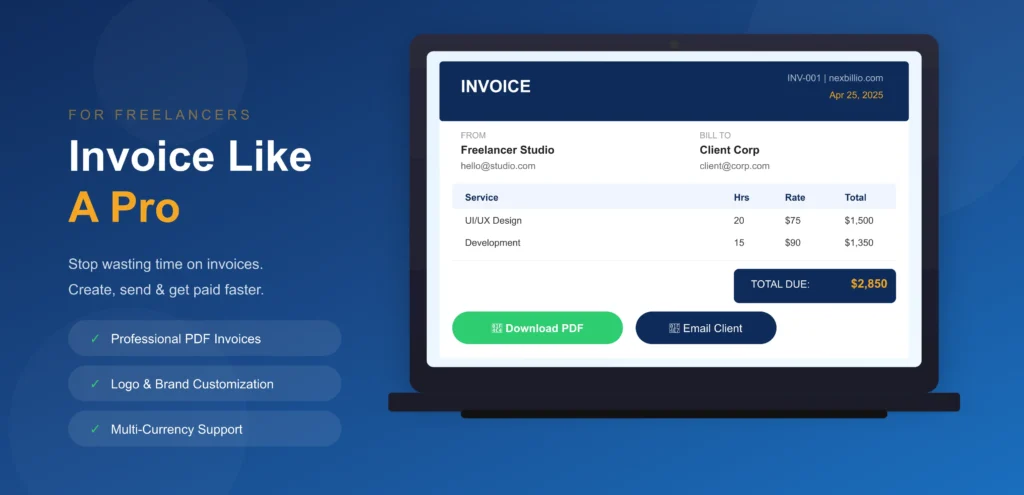
Table of Contents
- What Is a Freelance Invoice Generator?
- Free Invoice Generator for Freelancers – How to Create Your Invoice
- Step-by-Step: Create a Freelance Invoice in 60 Seconds
- Best Free Invoice Generator for Freelancers – 10 compulsory Features
- Best Invoicing Apps for Freelancers – Detailed Reviews
- Invoicing Platform for Freelancers – How to Choose the Right One
- Freelancer Invoice Generator – 5 Invoice Templates Explained
- Invoicing System for Freelancers – Set Up in 5 Minutes
- Best Invoice Software for Freelancers
- Pro Tips to Get Paid Faster
- FAQs – Invoice Generator for Freelancers
- Conclusion –This Invoice Generator Is the Best Invoice Generator for Freelancers
1. What Is a Freelance Invoice Generator?
A freelance invoice generator is an online tool that lets independent workers, designers, writers, developers, photographers, consultants, and more, create and send professional invoices to clients without needing accounting software or design skills. You simply enter your details, add your services and rates, and generate a clean pdf invoice in seconds.
Why Every Freelancer Needs a Dedicated Invoice Generator
Using a generic billing tool or a spreadsheet to invoice clients is unprofessional, error-prone, and time-consuming. A purpose-built freelancer invoice generator solves all of these problems:
- Professional Appearance: Branded, clean invoice layouts that show clients you run a serious business
- Automatic Calculations: Tax, discount and total calculations done instantly without math errors
- Faster Payment: Clients who receive clear, professional invoices pay 45% faster on average
- Time Savings: Create a complete invoice in under 60 seconds vs 15 minutes with a spreadsheet
- Invoice Tracking: Know exactly which invoices are paid, pending, or overdue at a glance
- Legal Compliance: Proper invoice format with all required fields for tax and legal purposes
- Payment Integration: Accept credit card, bank transfer, and PayPal payments directly from your invoice
What Makes the Best Invoice Generator for Freelancers?
Not all invoice generators are equal. The best invoice generator for freelancers must have these essential qualities:
- Free or very low cost :Freelancers should not pay $30+/month just to invoice clients
- No technical setup :Works instantly in a browser with no installation or learning curve
- Professional templates :Multiple designs that match any freelance niche or brand
- Logo upload :Personal branding is essential for freelance credibility
- Auto calculation :Tax, discount, and totals update automatically as you type
- pdf download :Instant, clean pdf that can be emailed to any client
- Invoice history :Save and access past invoices without recreating them
- Payment integration :Stripe, PayPal, or bank transfer options built in
- Mobile-friendly :Create invoices from phone or tablet on the go
- Email delivery :Send invoices directly to clients from the tool
2. Free Invoice Generator for Freelancers – How to Create Your Invoice
Creating a professional invoice with Free Invoice Generator takes less than 60 seconds. Here is the complete step-by-step process:
- Upload Your Logo: Click the logo upload box and add your business or personal brand logo. A professional logo makes your invoice look polished and increases payment rates.
- Enter Your Business Details: Add your name or business name, email, phone, and address. This appears in the 'From' section. Free Invoice Generator remembers these details for all future invoices.
- Enter Your Client Details: Add your client's name, company, email, and billing address. The 'Bill To' section is auto-formatted for a clean, professional layout.
- Set Invoice Number and Dates: Your invoice number is auto-generated (INV-001, INV-002, etc.). Set the issue date and due date. Choose from Net 7, Net 15, Net 30, or a custom date.
- Add Your Services and Rates: Enter each service or product, quantity, and price. Unlimited line items: add as many as you need. All amounts calculate instantly.
- Apply Tax, Discount, and Expenses: Enter your tax rate, apply a discount percentage, and add any reimbursable expenses. The total updates in real time.
- Download pdf or Send: Click 'Download pdf for an instant, professional pdf invoice. Or click 'Email to Client' to send directly from our Invoice generator. Done: ready to get paid.
3. Best Free Invoice Generator for Freelancers-10 compulsory Features
When evaluating any free invoice generator for freelancers, these are the 10 features that separate a truly useful tool from a basic template. Invoice maker delivers all 10 completely free:
1: Professional Freelance Invoice Templates
Your invoice is a direct reflection of your professional brand. Nexbillio offers 50+ freelance invoice templates designed by professional graphic designers, covering every creative and technical niche:
- Graphic Designer Invoice Template :portfolio reference, revision rounds, licensing rights
- Web Developer Invoice Template :hourly billing, sprint-based, project milestone
- Content Writer Invoice Template :word count billing, retainer, per-piece
- Photographer Invoice Template :shoot location, usage rights, deliverables list
- Video Editor Invoice Template :footage hours, export formats, revision rounds
- Social Media Manager Invoice Template :platform breakdown, content calendar reference
- Consultant Invoice Template :day rate, project scope and deliverables summary
- Virtual Assistant Invoice Template :hourly billing, task categories, weekly summary
2: Time Tracking Integration
The best invoicing tools for freelancers integrate directly with time tracking. My online Invoice Generator built-in time tracker lets you:
- Log hours directly in the invoice tool :no separate app needed
- Assign tracked hours to specific clients and projects
- Convert tracked time to invoice line items in one click
- Set hourly rates per project or per client :all calculated automatically
- View a complete timesheet report before generating your invoice
3: Automatic Tax Calculation
Freelancers billing clients across different regions need tax flexibility. Free Invoice Generator for freelancers handles:
- VAT (Value Added Tax) :EU, UK, Australia, and 140+ countries
- GST (Goods and Services Tax) :India, Canada, Australia, New Zealand
- Sales Tax :US state-by-state rates with auto-detection
- Withholding Tax :Pakistan, India, South Asia, and MENA region
- Tax-exempt invoices :for clients who provide tax exemption certificates
- Multiple tax rates on a single invoice :compound tax calculation supported
4: Client Payment Integration
The biggest frustration for freelancers is getting paid. This makes payment as easy as possible for your clients:
- Stripe Pay Button: Add a 'Pay Now' button directly on your invoice pdf :clients pay instantly by credit card
- Bank Transfer Details: Add your account number, IBAN or routing number for direct bank payment
- PayPal Integration: Add your PayPal email or payment link to your invoice footer
- Wise Payment Link: Add a Wise receiving link for international clients in 40+ currencies
- Crypto Payment Address: Add your Binance, USDT or other crypto wallet for digital currency payments
5: Invoice History and Status Tracking
Keeping track of all your invoices is critical for managing your freelance cash flow. Best invoice generation tools provides free invoice history dashboard shows:
- All invoices by status: Draft, Sent, Pending, Paid, Overdue
- Total revenue for any date range :daily, weekly, monthly, or annually
- Outstanding amounts :exactly how much you are owed right now
- Overdue alerts :which invoices have passed their due date
- Client breakdown :revenue per client to identify your most valuable relationships
6: Automated Payment Reminders
Late payments are the #1 problem for freelancers. Free Invoice Generator automated reminder system:
- Sends a polite reminder 3 days before the due date
- Sends a firm reminder on the due date if unpaid
- Sends an overdue notice at 7, 14, and 30 days past due
- Personalizes each reminder with the client's name and invoice details
- Let’s you customize reminder templates with your own message and tone
- Stops reminders automatically when payment is received
7:Multi-Currency Invoicing
International freelancers need to bill clients in their local currency. Online Invoice Generator free supports:
- 100+ currencies including USD, EUR, GBP, AUD, CAD, PKR, AED, INR, and more
- Currency symbol auto-formatting :correct placement and decimal conventions for each currency
- Dual-currency invoices :show amounts in both your currency and your client's currency
- Live exchange rate display :show clients the current conversion rate
8: Recurring Invoice Automation
For freelancers on monthly retainers or subscription billing, recurring invoices save hours every month:
- Set a recurring schedule: weekly, bi-weekly, monthly, or quarterly
- Invoice auto-generates and sends on the scheduled date
- Auto-increments invoice number for each new billing cycle
- Pause or cancel recurring billing with one click
- Get notified when each recurring invoice is sent and when it is paid
9: Professional pdf Quality
The pdf your client receives must look completely professional. This invoicing platform for freelancers generates:
- High-resolution PDF that prints perfectly on A4 and US Letter paper sizes
- Pixel-perfect layout that matches the on-screen preview exactly
- No watermarks, no branding on your invoice :it is 100% yours
- File size under 500KB :easy to email and attach to any communication
- Compatible with all PDF viewers: Adobe Acrobat, Preview, Chrome, and all browsers
10: Mobile Invoice Creation
The best invoicing apps for freelancers work on mobile. NexBillio is fully optimized for all devices:
- Works on iPhone, Android, tablet, laptop, and desktop :any browser
- No app download required :open your browser and start invoicing immediately
- Touch-optimized interface :easy to use on small screens
- Full feature parity :every desktop feature is available on mobile
- Create, edit, preview, and send invoices from anywhere in the world
4. Best Invoicing Apps for Freelancers, Detailed Reviews
Here is an honest, detailed review of every major invoicing app and platform for freelancers: so you can choose the right tool for your specific situation:
Best Overall Free Invoicing Tool for Freelancers
Our free invoice generator tool is the most complete free invoicing tool for freelancers available today. It combines the professional template quality of Adobe Express, the billing management features of FreshBooks and the ease of use of invoice-generator.com: all in one free platform.
- Pros: Unlimited free invoices, 50+ templates, Stripe payments, time tracking, AI auto-fill, invoice history, multi-currency, recurring billing, automated reminders, all free
- Cons: Advanced accounting features (payroll, inventory) require upgrade :but these are rarely needed by freelancers
- Best For: Freelancers of all types, especially those who need professional branding, payment integration, and invoice management without paying a monthly fee
- Monthly Cost: $0 :Free forever for all core invoicing features
5. Invoicing Platform for Freelancers – How to Choose the Right One
With so many invoicing platforms for freelancers available, the right choice depends on your specific situation. Use this decision framework to find the perfect match:
Choose by Freelance Stage
| Your Situation | What You Need | Best Platform | Monthly Cost |
|---|---|---|---|
| Just starting out | Simple, fast, free | NexBillio | $0 Free |
| 1–5 regular clients | History + reminders | NexBillio / Zoho | $0–$15/mo. |
| International clients | Multi-currency + Wise | NexBillio / Wise | $0 Free |
| Retainer clients | Recurring billing | NexBillio / FreshBooks | $0–$19/mo. |
| Time-based billing | Time tracking + invoice | NexBillio / QuickBooks | $0–$19/mo. |
| High income + taxes | Full accounting suite | NexBillio | Totally Free |
| Any situation | Best free all-rounder | NexBillio | $0 Free Forever |
Questions to Ask Before Choosing Your Invoicing Tool
- How many invoices do you send per month? (Under 10: any free tool. Over 10: our tool gives unlimited free)
- Do you have international clients? (Yes: need multi-currency support :It has 100+ currencies free)
- Do you bill by the hour? (Yes: need built-in time tracking :This generator and FreshBooks both offer this)
- Do you have retainer clients? (Yes: need recurring invoice automation :our invoicing tool supports this free)
- Do you need full accounting? (Yes: QuickBooks or FreshBooks. No: InvoicePro is all you need)
- What is your budget? ($0: NexBillio wins. $20+/month budget: FreshBooks or QuickBooks)
6. Freelancer Invoice Generator: 5 Invoice Templates Explained
Knowing which invoice template to use for different freelance situations is important. Here are the 5 most-used freelance invoice templates and when to use each:
6.1 Standard Freelance Invoice
The most common invoice type for freelancers is this invoice generator. Use this for any completed project or service delivery where you are requesting payment after the work is done.
- When to Use: After completing a project, delivering files, or finishing a service
- Key Fields: Service description, hours or units, rate, total, due date, payment instructions
- Payment Terms: Net 7 for new clients, Net 15 or Net 30 for established clients
6.2 Freelance Proforma Invoice
A proforma invoice is sent before work begins to confirm the scope and price. It is not a payment demand; it is a formal quote that both parties agree to before the project starts.
- When to Use: Before starting a project to get client approval on price and scope
- Key Fields: Same as standard invoice but labeled 'Proforma Invoice' at the top
- Tip: Convert your proforma invoice to a standard invoice automatically once the work is complete
6.3 Freelance Milestone Invoice
Used for large projects broken into phases. You invoice at each milestone, for example, 25% upfront, 50% at midpoint, 25% on delivery.
- When to Use: Long-term projects worth $2,000+ where phased payments protect your cash flow
- Key Fields: Project name, milestone description, milestone number, amount due, project total for reference
- Tip: Always get the first milestone payment before starting work. Never start a project with $0 collected.
6.4 Freelance Retainer Invoice
A retainer invoice is sent monthly (or weekly) to clients who pay you a fixed amount for ongoing availability or regular work. This is the most stable income model for freelancers.
- When to Use: Monthly retainer agreements for ongoing services
- Key Fields: Retainer period (e.g., March 2025), scope summary, fixed monthly amount
- Tip: Set up recurring invoices in InvoicePro and your retainer invoice auto-sends every month
6.5 Freelance Expense Reimbursement Invoice
When clients agree to pay for project expenses (software, travel, materials, subcontractors), create a separate or combined expense reimbursement invoice.
- When to Use: When you have billable expenses in addition to your service fee
- Key Fields: Each expense item, receipt date, amount, and a note that these are pass-through costs
- Tip: Always agree on expense reimbursement terms before incurring costs :put it in your contract
7. Invoicing System for Freelancers - Set Up in 5 Minutes
A proper invoicing system for freelancers is not just a tool :it is a complete workflow that ensures you always get paid on time. Here is how to set up a bulletproof freelance billing system using InvoicePro in just 10 minutes:
Your Complete Freelance Invoicing System
- Create Your Free InvoicePro Account: Sign up with your email. Upload your logo. Enter your business name, email, address, phone number, and payment details. Enable your tax settings.
- Create Invoice Templates for Your Services: Set up 2–3 template invoices that cover your most common billing scenarios. Save them as drafts so you can duplicate and send quickly for any new project.
- Add Your Clients : Add your regular clients to your client database. InvoicePro remembers their billing address, email, payment preferences, and billing history automatically.
- Connect Stripe for Instant Payments : Link your Stripe account to InvoicePro. Every invoice you send will include a 'Pay Now' button so clients can pay by credit card in one click.
- Enable Automated Reminders : Set your reminder schedule once: pre-due reminder at Day -3, due date reminder at Day 0, and overdue reminders at Day +7 and Day +14. InvoicePro handles everything automatically.
- Set Up Recurring Invoices for Retainer Clients: For monthly clients, create a recurring invoice that auto-sends on the same date every month. Never forget to invoice a retainer client again.
8. Invoicing Tools for Freelancers
Different freelance specializations have different invoicing needs. Here is the best invoicing tool recommendation for each major freelance niche:
Best Invoicing Tool for Graphic Designers
Graphic designers need invoicing software that supports project-based billing, revision tracking, and usage licensing fees. InvoicePro's designer template includes revision rounds as a billable line item and supports usage rights licensing notes.
- Best platform: NexBillio is free or FreshBooks is paid
- Key features needed: logo upload, project-based billing, revision tracking, pdf download
Best Invoicing Tool for Web Developers
Web developers often bill by milestone, sprint, or hourly rate. Invoice generator developer template supports all three billing models and includes hosting, domain, and third-party service cost pass-through.
- Best platform: NexBillio (free) or QuickBooks (for tax-complex situations)
- Key features needed: milestone billing, hourly time tracking, expense reimbursement
Best Invoicing Tool for Writers and Content Creators
Writers need to bill per word, per article, per hour, or on retainer. InvoicePro supports all these billing methods and includes a content calendar reference field for editorial clients.
- Best platform: NexBillio (free) :sufficient for all writing billing needs
- Key features needed: per-unit billing (per word/article), retainer billing, email delivery
Best Invoicing Tool for Photographers
Photographers need invoices that cover shoot fees, post-production time, usage rights, and print or product sales. InvoicePro's photography template includes all of these fields.
- Best platform: NexBillio (free) or FreshBooks (for photographers with retail sales)
- Key features needed: session fees, usage rights, delivery format breakdown, deposit tracking
Best Invoicing Tool for Consultants
Management, IT, and business consultants typically bill day rates, project fees, or monthly retainers. InvoicePro handles all of these with professional templates that reinforce your expert positioning.
- Best platform: NexBillio (free) or FreshBooks (for high-volume consulting firms)
- Key features needed: day rate billing, retainer automation, expense reimbursement, multi-currency
Best Invoicing Tool for Virtual Assistants
Virtual assistants typically bill hourly and have multiple clients at different hourly rates. InvoicePro's time tracking feature manages multiple client rates and converts hours to invoice line items automatically.
- Best platform: NexBillio (free) :time tracking + multi-client billing is free
- Key features needed: hourly billing, multiple client management, time tracking, recurring invoices
9. Pro Tips to Get Paid Faster
Creating a great invoice is just the beginning. These 15 expert tips will dramatically reduce your payment wait time and late payment rate:
- Send Your Invoice the Same Day Work Is Completed: Same-day invoices are paid 40% faster than those sent a week later. Do not delay.
- Always Include a Specific Due Date: Never write 'payment due upon receipt' without a date. Write 'Payment due by March 31, 2025.'
- Add a Pay Now Button: Invoices with online payment buttons are paid 2x faster than those with only bank transfer details.
- Use Clear, Specific Descriptions: Write 'Homepage design: 3 revisions, final files in AI, PNG, PDF' not just 'Design work.' Specific descriptions reduce client questions and payment disputes.
- Charge a Late Fee and Enforce It: Add '1.5% monthly late fee after due date' to your payment terms. Clients who know you enforce late fees pay on time.
- Collect a Deposit before Starting: For projects over $500, require 30%–50% upfront. This confirms commitment and protects you if the client disappears.
- Follow Up Politely Before the Due Date: Send a friendly reminder 3 days before the invoice is due. Most clients appreciate the heads-up and pay on time.
- Invoice in the Client's Currency: International clients pay faster when the invoice is in their local currency. Use multi-currency invoicing to remove payment friction.
- Include Your Tax Number: B2B clients often cannot process invoices without your tax ID. Include it on every invoice.
- Use Professional Invoice Numbering: Sequential numbering (INV-001, INV-002) makes it easy for client accounts payable to process and reference your invoice.
- Add Multiple Payment Options: Some clients prefer bank transfer, some prefer credit card, some PayPal. The more payment methods you offer, the faster get payment.
- Keep Copies of Every Invoice: Save every invoice as a pdf and in your InvoicePro history. You need them for tax filing, client disputes, and financial records.
- Review Your Outstanding Invoices Weekly: Set a weekly calendar reminder to check your invoice dashboard and follow up on any unpaid invoices over 7 days old.
- Never Start New Work on Overdue Accounts: Pause work for clients with unpaid invoices over 30 days. This motivates payment and protects you from additional financial exposure.
- Offer Early Payment Discounts: Add '2% discount if paid within due days' to your terms. Many clients will take the discount, improving your cash flow significantly.
10. Frequently Asked Questions – Invoice Generator for Freelancers
Q1. What is the best free invoice generator for freelancers?
NexBillio is the best free invoice generator for freelancers in 2025. It offers unlimited free invoices, 50+ professional freelance invoice templates, auto-tax calculation, Stripe payment integration, invoice history, time tracking, automated reminders, and multi-currency support :all completely free with no sign-up required for basic use. It outperforms every competitor including FreshBooks, Zoho, QuickBooks, Wise, and Invoice Simple on features while being the only truly free option.
Q2. Is there a truly free invoice generator for freelancers?
Yes. NexBillio is genuinely free with no hidden fees, no trial period, and no credit card required. You can create unlimited invoices, download unlimited PDFs, and use all core billing features at no cost. Unlike FreshBooks that is free for 5 clients only or QuickBooks that gives trial only, InvoicePro has no artificial limits on its free tier. The only paid features are advanced accounting integrations that most freelancers never need.
Q3. What should a freelance invoice include?
A professional freelance invoice must include: your name/business name, address, email, and phone; your client's name and billing address; a unique invoice number; issue date and payment due date; an itemized list of services with quantity, unit price, and line total; subtotal, any applicable tax, and the grand total due; your payment method details (bank account, Stripe link, PayPal); and payment terms including any late fee policy. InvoicePro's templates include all required fields automatically.
Q4. What is the best invoicing app for freelancers on mobile?
NexBillio works flawlessly on all mobile devices through your browser: no app download required. For dedicated mobile apps, FreshBooks has the most polished iOS and Android apps among paid platforms. For a free mobile-first experience, InvoicePro's browser app is the best option, offering full feature parity between desktop and mobile with a touch-optimized interface.
Q5. How do I invoice clients as a freelancer?
To invoice clients as a freelancer: (1) Create your invoice using InvoicePro: add your details, client details, services, and rates. (2) Set clear payment terms with an explicit due date. (3) Download the PDF or email it directly to your client. (4) Follow up politely if payment is not received 3 days before the due date. (5) Send automated overdue reminders for unpaid invoices. Always maintain a record of every invoice sent in your InvoicePro dashboard.
Q6. What is the best invoicing software for freelancers who need time tracking?
NexBillio and FreshBooks both offer strong time tracking integrated with invoicing. InvoicePro's time tracker is free and converts logged hours directly to invoice line items with one click. FreshBooks offers more detailed reporting but costs $19+/month. For freelancer’s primarily needing time tracking plus invoicing at no cost, InvoicePro is the clear winner.
Q7. Can I use an online invoice generator for freelancers without creating an account?
Yes. NexBillio lets you create, customize, and download a professional invoice PDF without creating an account. Simply open the tool, fill in your details, and click Download PDF. No email addresses, no password, no credit card required. If you want to save invoice history, set up recurring invoices, and use automated payment reminders, create a free account in 30 seconds.
Q8. What is the best invoicing platform for freelancers billing international clients?
NexBillio is the best invoicing platform for freelancers with international clients because it supports 100+ currencies, auto-formats currency symbols and decimal conventions for each currency, and allows dual-currency invoices showing both your local currency and your client's currency. It also integrates with Wise and Stripe for international payment collection. No other free invoicing platform offers this level of international billing support.
Q9. How much should I charge as a freelancer: and how do I put it on an invoice?
Freelance rates vary widely by skill, experience, industry, and location. Common pricing models: hourly rate (charge per hour worked), project rate (fixed price for a defined scope), day rate (common for consultants and contractors), per-unit rate (per word, per photo, per item), and retainer (fixed monthly fee for ongoing availability). NexBillio's invoice templates support all of these billing models: select the line item type that matches your pricing structure.
Q10. What is the difference between invoicing tools, invoicing apps, and invoicing software for freelancers?
Tools for invoicing are simple, single-purpose tools for creating and downloading invoices :like NexBillio free invoice generator. Invoicing apps are mobile applications that add convenience features like expense tracking, photo receipts, and mobile time tracking. Invoicing software is a comprehensive platform that combines invoicing with accounting, tax filing, payroll, and reporting: like QuickBooks or FreshBooks. Most freelancers only need an invoicing tool (free) or app: full invoicing software is only necessary for high-revenue freelancers or those with employees.
Q11. Can I send invoices directly to clients from the freelance invoice generator?
Yes. NexBillio lets you email your invoice pdf directly to your client from within the tool. Enter your client's email address, add a personal message, and click Send. The client receives a professional email with your pdf invoice attached. You get a delivery confirmation and can track whether the client has opened your invoice. No need to download the pdf and attach it to a separate email manually.
Q12. What is an invoicing system for freelancers and do I need one?
An invoicing system is a complete workflow for creating, sending, tracking, and following up on invoices consistently. Every freelancer who bills clients regularly needs one. At minimum, your invoicing system should include: a tool for creating professional invoices (NexBillio), a schedule for when you invoice (same day as completion or monthly on a fixed date), a follow-up process for unpaid invoices, and a record-keeping system for tax purposes. Nexbillio-free platform handles all of these functions in one place.
Q13. Is the best invoicing tool for freelancers the same as accounting software?
No. The best invoicing tool for freelancers focuses on creating, sending, and tracking invoices and collecting payments. Accounting software adds tax filing, profit and loss reporting, payroll, bank reconciliation, and financial forecasting. Most freelancers do not need full accounting software: this dedicated invoicing tool handles everything billing-related, and you can export your invoice data to your accountant annually for tax filing.
Q14. How do I handle tax on my freelance invoices?
How you handle tax on freelance invoices depends on your location and business registration: In the US, most freelancers do not charge sales tax on services (check state laws). If self-employed, include your EIN or SSN. In the EU/UK, register for VAT when your revenue exceeds the threshold (£85,000 in the UK, varies by EU country) and add VAT at the applicable rate. In India, register for GST when revenue exceeds ₹20 lakh and charge GST at applicable rates.
Q15. What is the best invoicing tool for freelancers just starting out?
For freelancers just starting out, this is the absolute best choice. It is totally free, requires no sign-up for basic use, works on any device, creates professional invoices in under 60 seconds, and includes a Stripe payment button so your first clients can pay immediately. As your business grows, this free invoice maker scales with you: adding invoice history, client management, time tracking, recurring billing, and automated reminders. There is no need to switch platforms as you grow.
11. Conclusion – NexBillio Is the Best Invoice Generator for Freelancers
Whether you are a graphic designer invoicing your first client, a seasoned consultant managing 20 retainer relationships, or a developer billing international clients in multiple currencies: Nexbillio is the best invoicing platform for freelancers in 2025. Here is a final summary of why:
- Best free invoice generator for freelancers :unlimited invoices at zero cost
- 50+ professional freelance invoice templates for every creative and technical niche
- Free time tracking that converts logged hours to invoice line items in one click
- Built-in Stripe pay button :get paid by credit card directly from your invoice
- Automated payment reminders that reduce late payments by up to 40%
- Multi-currency billing supporting 100+ currencies for international freelancers
- Recurring invoice automation for retainer clients :set once, runs forever
- Invoice history and status dashboard :always know what you are owed
- Mobile-friendly :create and send invoices from any device, anywhere
- No sign-up required for basic use :start invoicing in under 60 seconds
This is one of the best free invoice generators I’ve come across. It saves time and makes invoice creation super simple. I would definitely recommend it to freelancers, business owners, and anyone working with platforms like PayPal, Shopify, or eBay.