
NexBillio
Click to upload logo
PNG, JPG, SVG up to 5MB| Description | Qty | Unit Price | Amount |
|---|---|---|---|
| Add items to see your invoice | |||
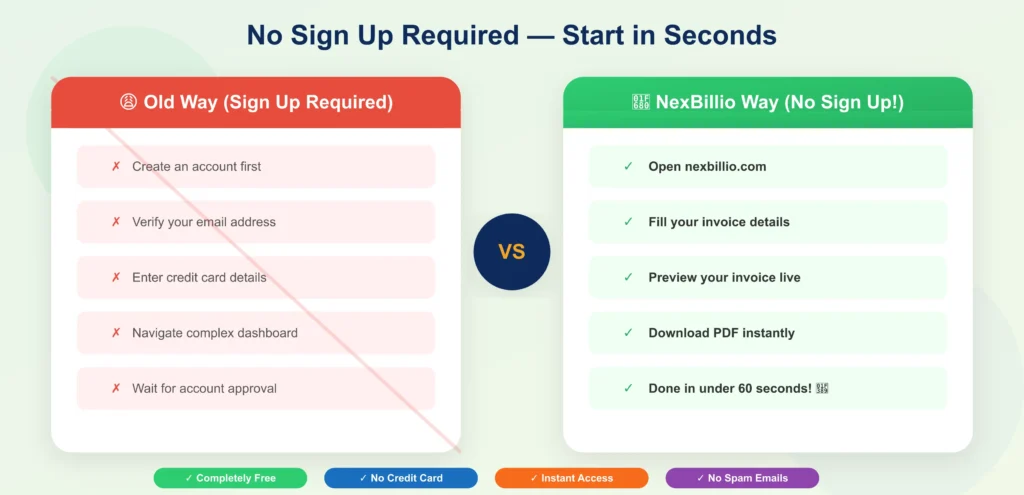
Whether you are a freelancer, small business owner, contractor or ecommerce seller, you need a fast, reliable and free online pdf invoice generator to get paid on time. Nexbillio is the most powerful free invoice generator pdf tool online with no signup required no hidden fees and no software to install. In seconds, you can create a professional pdf invoice, add your logo, set custom tax and discounts and download or email your invoice directly to your client. Our free invoice generator also includes readymade invoice templates for every industry; from garage invoices to commercial invoices to ecommerce invoice templates. This complete guide covers everything you need to know about generating, customizing and sending pdf invoices.
Table of Contents
- What is a PDF Invoice Generator?
- Why pdf is the Best Format for Invoices
- Key Features of pdf Invoice Generator
- Step-by-Step: How to Create a pdf Invoice
- Best Practices to Get Paid Faster
- Free Online pdf Invoice Generator – Key Features
- Invoice pdf Generator: 10 Invoice Types You Can Create
- Make Invoice PDF: Best Practices to Get Paid Faster
- What Every Professional Invoice PDF Must Include
1. What is a pdf Invoice Generator?
A PDF invoice generator is a powerful online tool that allows businesses, freelancers, and agencies to create professional invoices in seconds. Instead of manually designing invoices, you can instantly generate a clean, ready-to-send pdf file with all calculations done automatically.
2. Why pdf is the Best Format for Invoices
PDF is considered the most reliable format for invoicing because it ensures consistency and professionalism across all devices. Whether your client opens the invoice on mobile, laptop, or prints it, the layout remains perfect. Additionally, pdfs are secure and cannot be easily modified, making them ideal for official transactions.
3. Key Features of pdf Invoice Generator
Our pdf invoice generator includes everything you need for fast and accurate billing:
- Automatic calculations for tax, discount, and totals
- Instant PDF download with one click
- Add your logo and branding
- Send invoices directly via email
- Support for multiple currencies (USD, PKR, EUR, etc.)
- Clean and professional invoice layout
4. Step-by-Step: How to Create a pdf Invoice
Creating a professional invoice takes less than a minute:
- Enter your business details (name, email, address)
- Add client information
- Insert products or services
- Apply tax, discount, or shipping
- Click download to generate your PDF invoice
5. Best Practices to Get Paid Faster
To improve your payment speed, follow these proven strategies:
- Send invoices immediately after completing work
- Always include a clear due date
- Use professional formatting and branding
- Send polite reminders for unpaid invoices
- Offer multiple payment methods
6. Key Features of Free Online pdf Invoice Generator
Our free online pdf invoice generator includes every feature you need to run your billing process professionally. Here is a complete breakdown:
6.1 Invoice pdf Core Features
- Unique Invoice Number that is auto generated and fully editable
- Issue date and due date
- Business name, Logo, address, phone and email
- Client name, company, billing address, email and phone
- Itemized line items: Description, quantity, unit price, amount
- Subtotal, Tax , Discount , Shipping ,all auto calculated
- Grand Total Due
- Payment Instructions and Bank Details
- Notes, terms & conditions and thank you message
- Invoice status: draft, pending and paid
6.2 pdf Download & Delivery Options
- Instant pdf Download: One click generates a perfect pdf
- Print Invoice: Direct browser print invoice ,no any other tools required
- Email Invoice to Client: Send pdf directly from the tool to your client's email
- Save to Invoice History: All invoices stored in your account for future reference
- Stripe Pay Button: Add a payment link so clients can pay your invoice online
6.3 Customization Options
- Custom Colors: Match your invoice to your brand palette
- Logo Upload: PNG, JPG, SVG ,your brand front and center
- Invoice Title: Change invoice name like ‘Invoice’ to Tax Invoice, Proforma Invoice and Quote etc.
- Currency Selector: 100+ currencies including USD, EUR, GBP, PKR, AED, CAD, AUD
- Tax Label: Customize as VAT, GST, HSN, PST etc.
7. Invoice pdf Generator: 10 Invoice Types You Can Create
Our invoice pdf generator supports all major invoice types used in business and international trade. Each type is available as a free pdf download:
- Standard Invoice: The most common type used for regular sales of products or services with standard payment terms.
- Proforma Invoice pdf: A preliminary invoice sent before goods or services are delivered. Simply change the title from Invoice to Proforma Invoice.
- Commercial Invoice pdf: Required for international shipments.
- Credit Note: Issued to cancel or partially reverse a previous invoice. Used for refunds and billing corrections.
- Debit Note: Issued by the buyer to the seller for returned goods or billing adjustments.
- Recurring Invoice pdf: Automatically generated on a schedule, ideal for monthly retainers, subscriptions and maintenance contracts.
- Timesheet Invoice: Includes billable hours, hourly rate, project name and date ideal for consultants and hourly workers.
- Milestone Invoice: Sent at project milestones. Shows percentage of project complete and amount due at each stage.
- Retainer Invoice: Used to bill clients in advance for ongoing work. Common for law firms, agencies and consultants.
- Receipt Invoice: Combines an invoice and a payment receipt in one document. Used for immediate cash payments.
8. Make Invoice pdf: Best Practices to Get Paid Faster
Knowing how to make invoice pdf files is just the first step. These professional best practices will help you get paid faster and reduce late payments:
Invoice Timing Strategies
- Send invoices on the same day: Invoices sent on the same day as work completion are paid 30% faster than those sent a week later.
- Use 'Due on Receipt' for new clients: Until you establish a payment history, require payment immediately.
- Request a deposit upfront: For large projects, collect 20 to 40% before starting project. Use a milestone invoice for the remainder.
- Set clear due dates: Specify an exact due date, never net 30 from invoice date without specifying the invoice date.
Follow-up Schedule for Unpaid Invoices
- Day 1 (Invoice Sent): Send invoice pdf with a friendly cover message.
- Few Days Before Due Date: Send a polite reminder: Just a friendly reminder that Invoice INV, 001 for $X will due after few days.
- Day 7 (Due Date): Send a firm reminder with the invoice pdf attache.
- Day 14 (7 Days Overdue): Send an overdue notice mentioning late fee.
- Day 30 (23 Days Overdue): Send a final demand letter and consider pausing work.
- Day 45+: Consider engaging an agency or small claims court.
9. What Every Professional Invoice pdf Must Include
A legally compliant and professional invoice pdf must contain these essential elements. Missing any of these can delay payment or create legal issues:
Required Fields Checklist
- Invoice Title: The word 'Invoice' clearly printed at the top
- Unique Invoice Number: Sequential numbering system
- Invoice Issue Date: The date the invoice was created and sent
- Payment Due Date: The exact date by which payment must be received
- Seller Details: Your full legal name, business name, address, email and contact number
- Buyer Details: Client's full name, company name, billing address and email
- Itemized List of Services or Products: Description, quantity, unit priceand total of each item
- Subtotal: Sum of all line items before tax and discounts
- Discount: If applicable ,shown as percentage or fixed amount
- Tax Amount: Tax rate and calculated amount
- Shipping: If applicable
- Grand Total Due: Final amount the client owes
- Payment Method Instructions: Bank account details, PayPal, Stripe link or other accepted payment methods
- Notes & Terms: Late payment fee policy, warranty terms or thank you message