
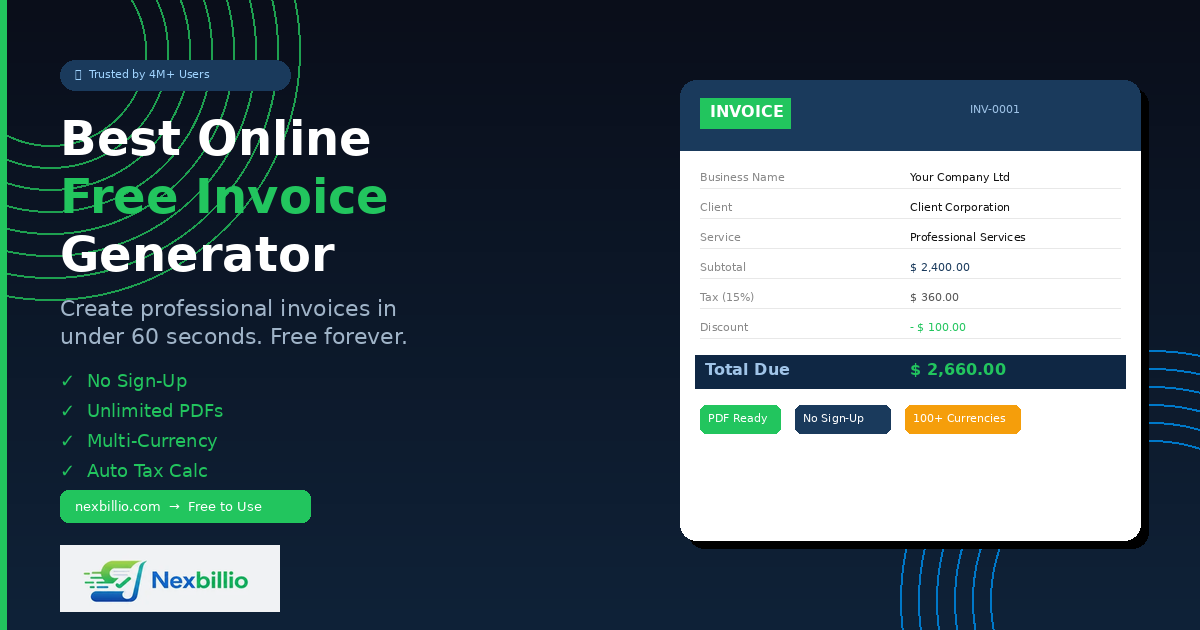
Billing clients should be the easy part of running a business. You did the work. You delivered the results. Now you just need to send an invoice and get paid. But for millions of freelancers and small business owners, creating that invoice is where things go sideways wrong totals, missing tax fields, ugly formatting, and tools that charge you just to download a PDF.
That is exactly why people search for the best online free invoice generator. Not a trial. Not a “free plan” that locks core features behind a paywall. A genuinely free, professional-grade tool they can use right now without signing up or pulling out a credit card.
Nexbillio is that tool. This guide covers what makes it the most talked-about free invoice generator online today its features, who it is built for, and why it consistently outperforms paid competitors on the things that actually matter.
What Is a Free Online Invoice Generator, Really?
A free online invoice generator is a web-based tool that lets you fill in your business details, add your services or products, apply taxes and discounts, and download a professional PDF invoice all without paying anything or creating an account.
The difference between a good invoice generator and a mediocre one comes down to three things: speed, accuracy, and professionalism. The best tools handle the math automatically, produce clean branded documents, and work on any device. The rest just give you a blank form with a table and call it a generator.
Nexbillio was built around those three principles. The result is a tool that a freelance graphic designer in Lahore, a small construction firm in Texas, and an e-commerce seller in London can all use in the same 60 seconds without any confusion.
Who Actually Needs This Kind of Tool?
Before diving into features, it helps to understand who searches for a free invoice generator online and why.
Freelancers make up the largest group. Whether you are a copywriter, web developer, photographer, or social media manager, you likely send invoices weekly — sometimes multiple in a single day. You do not have time to open spreadsheets and manually calculate totals. You need a tool that lets you fill in a few fields and hit download.
Small business owners are the second major group. A shop owner, a plumber, a digital agency with five employees — none of them want to pay $30/month for invoicing software when all they need is a clean invoice with their logo on it.
Contractors and service providers round out the third group. These are people billing by the hour or by the project — electricians, consultants, IT professionals, coaches. They need something accurate, fast, and presentable.
Nexbillio was designed to serve all three groups without compromise.
The Features That Actually Matter in a Free Invoice Generator
Most review articles list features without explaining why they matter. Here is a breakdown of what Nexbillio offers and why each feature makes a real difference in how quickly you get paid.
No Sign-Up Required
This is the first thing users notice. You land on the page, start filling in your details, and your invoice is ready. No email verification, no password, no account confirmation. Just open, fill, download.
Competitors like FreshBooks and Zoho Invoice require you to create an account even to use their free plan. That alone adds friction — and for someone who needs to send an invoice right now, friction translates to delays.
With Nexbillio, there is zero barrier between you and a professional invoice.
Completely Free — No Hidden Charges
The word “free” gets abused constantly in software. Most tools offer a free tier that removes watermarks only on a paid plan, locks PDF downloads behind a subscription, or limits you to five invoices per month.
Nexbillio charges nothing. You can generate unlimited professional PDF invoices, add your logo, apply multiple tax rates, include discounts, and download everything — all at zero cost. There is no paid upgrade required to access any of the core billing features.
Real-Time Live Preview
One of the most practical features Nexbillio offers is its live preview panel. As you fill in your details on the left side of the screen, the invoice updates on the right in real time. You see exactly what your client will see the moment you download the PDF.
This matters because it eliminates the “generate and check” loop that wastes time on most tools. You can spot a typo in the client’s company name, notice that the tax rate looks off, or see that your description runs too long — all before downloading anything.
Auto-Calculated Taxes, Discounts, and Totals
Manual math on invoices is where most errors happen. A freelancer adds up three line items, forgets to include a percentage discount, and then calculates the tax on the pre-discount total instead of the post-discount amount. The client either catches it and loses trust, or pays the wrong amount and complicates your bookkeeping.
Nexbillio handles every calculation automatically. Enter your line items with quantities and unit prices. You add a global discount (percentage or fixed amount). You apply one or more tax rates — VAT, GST, HST, sales tax, whatever applies to your location. The tool calculates the subtotal, applies the discount, adds tax on the correct base, and gives you the final amount due. Every time. Without error.
Multi-Currency Support Across 100+ Currencies
If you bill clients outside your home country, currency is a constant friction point. Nexbillio supports over 100 currencies including USD, EUR, GBP, CAD, AUD, INR, PKR, AED, SAR, JPY, CHF, and SGD — among many others.
You select your currency from a dropdown and the invoice reflects it throughout. No manual editing of symbols, no formatting issues. The PDF your client receives shows the correct currency in the right format.
This is particularly valuable for freelancers in Pakistan, the Middle East, South Asia, and Southeast Asia who bill clients in the United States or Europe.
Logo Upload and Branding
A branded invoice communicates professionalism before the client even reads the numbers. Nexbillio lets you upload your business logo (PNG, JPG, or SVG, up to 5MB) and it appears cleanly at the top of the invoice.
Most generic invoice tools ignore this entirely. Nexbillio treats it as a core feature, not a premium add-on.
Multiple Invoice Types in One Tool
Different billing situations require different invoice formats. Nexbillio handles all of them from a single interface:
- Invoice — the standard payment request for work completed
- Quote — a price estimate before work begins
- Receipt — confirmation that payment has been received
- Proforma Invoice — a preliminary document used in international trade or to confirm order details
- Estimate — a non-binding cost projection
- Credit Note — issued when you need to cancel or reduce a previous invoice
Switching between types takes one click. Everything else — your business details, line items, tax rates — stays exactly as you entered it.
Invoice Status Tracking
Nexbillio includes four invoice status labels: Draft, Sent, Unpaid, and Paid. While this is a lightweight system compared to full accounting software, it gives solo operators a simple way to track where each invoice stands.
Mark it as Draft while building it. Switch to Sent after emailing it. Update to Paid when the money arrives. It is simple, fast, and enough for most freelancers and small businesses.
Color Themes for Consistent Brand Identity
Beyond just uploading a logo, Nexbillio allows you to choose a color theme for your invoice. This means your invoice can match your brand colors — a detail that separates polished professional billing from generic template-style documents.
Payment Terms, Notes, and Bank Details Section
Getting paid faster often comes down to clarity. Nexbillio gives you dedicated fields for:
- Payment terms (Due on Receipt, Net 7, Net 15, Net 30, Net 45, Net 60)
- A notes field for custom messages to the client
- Terms and conditions
- Payment details and bank information
Including bank details directly on the invoice removes a common friction point — clients do not have to email back asking how to pay. Everything they need is right there.
Shipping and Handling Field
For product-based businesses and e-commerce sellers, shipping costs are a normal part of invoicing. Nexbillio includes a dedicated shipping and handling field so you do not have to add it as a line item with a workaround description.
Advanced Options for Professional Customization
Nexbillio includes an advanced section with practical options that most free tools skip entirely:
- Show Watermark — adds a faint background text to draft invoices
- Show Addresses — toggle full address display on or off
- Signature Label — add an authorized signature label to the document
- Custom Footer Text — include any text you want at the bottom of every invoice
These small options make a big difference when you need to customize invoices for specific clients or industries.
How Nexbillio Compares to Other Popular Free Invoice Generators
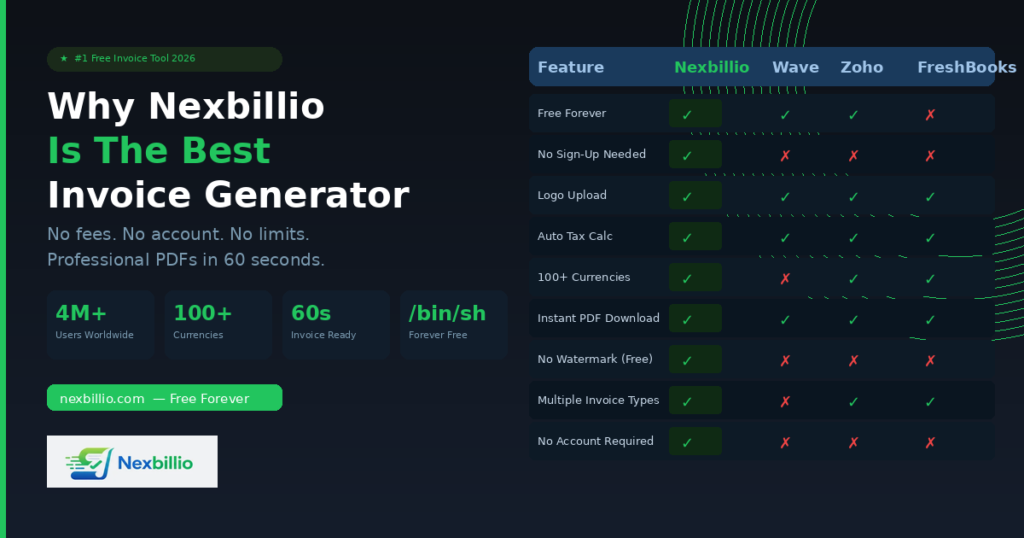
You will find many tools claiming to be the best free invoice generator. Here is an honest comparison of how Nexbillio stacks up against the most commonly used alternatives.
Wave Invoicing is a solid tool but requires account creation and is primarily positioned as an accounting platform. If you just need to send a quick invoice without setting up bookkeeping, Wave adds unnecessary complexity.
Zoho Invoice offers a generous free plan but again requires an account and is part of a larger business suite. For a freelancer who just wants an invoice, navigating Zoho’s ecosystem can feel like using a sledgehammer to crack a nut.
Invoice2go is a paid app with a limited free trial. It is excellent for mobile-first users but not truly free for ongoing use.
Shopify’s Invoice Generator is free and requires no sign-up, but it produces a very basic document with limited customization — no logo color theme options, no advanced fields.
FreshBooks is one of the most respected invoicing and accounting tools available, but it is a paid subscription service. The free trial lasts 30 days.
PayPal Invoicing is built into PayPal accounts and works well if you and your client both use PayPal, but it is tightly tied to that payment ecosystem and limits your flexibility.
Nexbillio sits in a distinct position: completely free, no account required, professionally designed, feature-rich, and genuinely accessible to anyone in any country billing in any currency. It is not trying to be accounting software. It is trying to be the best invoice generator online — and it delivers on that focus.
Country-Specific Tax Compliance
One underrated feature of Nexbillio is its awareness of regional tax requirements. The tool is designed to work smoothly for businesses in:
- USA — Sales tax, EIN/SSN fields, USD support
- United Kingdom — VAT, HMRC-compliant format, GBP
- Canada — GST/HST, CRA-ready, CAD
- Australia — ATO-compliant, ABN field, 10% GST
If you are in the UK and need to add VAT, you do not have to figure out a workaround. The tool already supports it. Same for GST in Australia or Canada, or sales tax in the US. You enter your rate and the calculation happens correctly, every time.
Platform Integrations That Make Nexbillio More Useful
Nexbillio works as a standalone invoice generator, but it also connects naturally with the platforms where real business happens:
Amazon sellers can use Nexbillio to generate invoices for marketplace transactions — something Amazon’s built-in system often makes unnecessarily complicated.
Shopify store owners can create branded invoices that match their store’s identity, without relying on Shopify’s basic invoice templates.
PayPal users can generate a Nexbillio invoice and reference PayPal payment details in the bank info section.
Stripe users can do the same, building a clean paper trail for their Stripe transactions.
These integrations are not automated plugins — they are about using Nexbillio alongside these platforms to produce professional documentation for every transaction.
What Makes Nexbillio the Right Choice for Freelancers Specifically
Freelancers have a unique relationship with invoicing. Unlike a business with a dedicated finance team, a freelancer handles everything alone — the work, the client relationship, the invoicing, and the follow-up. A tool that makes invoicing slower or more complicated is a genuine drain on earning time.
Nexbillio removes every unnecessary step. You open the tool, enter your client’s name and what you built or did for them, set your rate, apply any applicable taxes, and download a PDF that looks like it came from a design studio. The whole process takes under 60 seconds once you know the tool — and even on the first use, most freelancers are done in under three minutes.
There is also the professionalism factor. A clean, branded invoice signals to a client that you run your business seriously. That perception correlates with faster payment. Clients are less likely to sit on an invoice from someone who clearly has their professional act together.
Who Has Already Used Nexbillio?
Nexbillio has been used by more than four million businesses and independent professionals to create invoices, reduce billing errors, and get paid faster. That number includes freelancers, agencies, contractors, tutors, photographers, IT professionals, healthcare providers, real estate agents, and e-commerce sellers across dozens of countries.
The reason for that adoption is simple. The tool works, it costs nothing, and it does not require you to hand over your email address or go through an onboarding flow just to create a single invoice.
Final Assessment: Is Nexbillio the Best Free Online Invoice Generator?
For the specific task of creating a professional invoice quickly and for free, Nexbillio performs at a level that paid tools struggle to match. The combination of zero sign-up friction, genuinely unlimited free PDF downloads, real-time preview, automatic tax calculation, multi-currency support, logo upload, multiple invoice types, and country-specific tax compliance puts it in a category of its own among free tools.
If you need accounting software with full payment tracking, client portals, and automatic reminders, you will eventually outgrow any free invoice generator and need something like FreshBooks or QuickBooks. But for the majority of freelancers and small businesses — the people who need a clean, accurate, professional invoice right now — Nexbillio is the clearest choice available.
Open it. Fill it in. Download the PDF. Send it to your client. Get paid.
That is exactly what the best free online invoice generator should do — and that is exactly what Nexbillio does.
Ready to create your first invoice? Visit nexbillio.com and have a professional PDF invoice ready in under 60 seconds — no sign-up, no cost, no catch.