
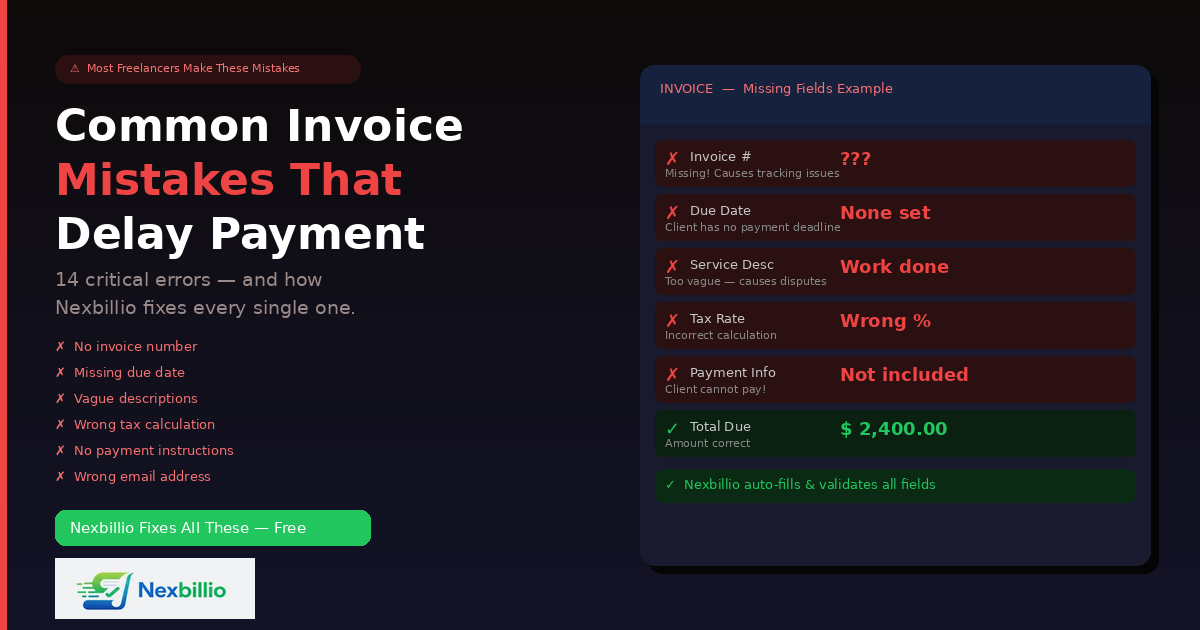
Getting paid should be the reward for doing good work. But thousands of freelancers, contractors, and small business owners wait weeks longer than they should simply because their invoices have mistakes in them. Not big mistakes. Not intentional ones. Just small, fixable errors that create confusion, delay approvals, or give clients an excuse to push payment to the next billing cycle.
The frustrating part is that most of these mistakes are completely avoidable. They happen because people are creating invoices manually, rushing through the process, or using tools that do not guide them through the right fields. The result is lost money, strained client relationships, and hours wasted chasing payments that should have arrived automatically.
This guide covers every major invoice mistake that freelancers and businesses make, explains exactly why each one causes payment delays, and shows how Nexbillio’s free online invoice generator eliminates each mistake — often without the user having to think about it at all.
Why Invoice Mistakes Cost You More Than You Think
Before getting into specific mistakes, it helps to understand what an invoice error actually costs.
The most obvious cost is time. Every invoice that gets questioned, bounced back, or ignored is an invoice you have to follow up on. That follow-up takes time — time that could have gone into client work or business development.
The second cost is trust. A client who receives an invoice with the wrong amount, missing tax details, or an incorrect company name starts to wonder about the professionalism of the person they hired. That first impression in the billing stage shapes how quickly they pay and whether they hire you again.
The third cost is cash flow. If your invoice is due Net 30 and gets kicked back for corrections on Day 15, the clock resets. Your 30-day wait just became a 45-day wait — and in the meantime, your rent, subscriptions, and supplier payments are due.
None of these costs are dramatic in isolation. But they compound. A freelancer who sends slightly wrong invoices consistently might be operating with a 20% longer average payment window than they need to — simply because of fixable errors.
Mistake 1: Leaving Out a Unique Invoice Number
An invoice without a unique reference number is like a package without a tracking number. It exists, but nobody can find it, reference it, or confirm it.
When a client’s accounts payable department receives your invoice, the first thing they do is log it against a reference number. If your invoice does not have one — or worse, if you sent two invoices with the same number — their system breaks down. The invoice gets flagged, sits in a review queue, and payment is delayed while someone manually sorts out the confusion.
Beyond client-side processing, invoice numbers matter for your own records. When you are filing taxes, reviewing annual revenue, or chasing an overdue payment months later, you need to be able to refer to “Invoice INV-0047” rather than “the invoice I sent to that client in March, the one for the website project.”
How Nexbillio handles it: Nexbillio automatically generates a sequential invoice number for every new invoice — starting at INV-0001 and incrementing from there. You can customize the format if you prefer a year-based system like 2026-001. The number appears clearly on the invoice, and you never have to remember what number you last used.
Mistake 2: Not Including a Due Date
This is the single most common reason freelancers get paid late. An invoice without a due date is an open invitation to procrastinate. Most clients will not pay on the day they receive your invoice unless there is a clear deadline attached to it. Without one, it sits in their inbox until they get around to it — which often means never, until you chase them.
“Due on Receipt” sounds clear, but in practice it is vague. Does that mean today? This week? Before the end of the month? Different clients interpret it differently. A specific date removes all ambiguity.
Psychology plays a role here too. A payment due on October 30 sits in a mental bucket labeled “October.” A payment with no due date sits in a mental bucket labeled “whenever.” Only one of those buckets gets emptied consistently.
How Nexbillio handles it: Nexbillio includes a dedicated Due Date field on every invoice, right next to the issue date. It also offers preset payment terms — Due on Receipt, Net 7, Net 15, Net 30, Net 45, and Net 60 — which automatically populate the due date based on the issue date you enter. You can also set a custom date if the project calls for it.
Mistake 3: Vague Service Descriptions
“Design work — $800.” What design work? For which project? Covering what deliverables? On which platform?
Vague line item descriptions are one of the most common causes of invoice disputes. The client receives a bill for something they cannot immediately match to a deliverable, and they send it back asking for clarification. You explain. They update their records. More time passes. Payment happens later than it should.
Even in the absence of a dispute, vague descriptions create accounting headaches on the client side. Their bookkeeper needs to categorize expenses. If your description does not tell them whether your work was a one-time project or an ongoing service, a digital deliverable or a physical product, a creative service or a consulting engagement, they have to ask.
Clear descriptions also protect you legally. If a payment dispute ever escalates, an invoice that says “Website redesign — 5 pages, including homepage, about, services, contact, and blog — $3,200” is a far stronger document than one that says “Web project — $3,200.”
How Nexbillio handles it: Nexbillio’s line item fields are structured to prompt complete information. Each line has a Description field, a Quantity field, and a Unit Price field. The tool encourages specificity by design — and because there is enough space in the description field to write a proper scope summary, not just a two-word label.
Mistake 4: Getting the Tax Calculation Wrong
Tax errors on invoices fall into two categories: applying the wrong rate, and applying the right rate to the wrong base.
Applying the wrong rate is common when businesses operate across regions or when tax rates change and old habits carry over. A freelancer in the UK who forgets to update their VAT rate, or a Canadian consultant who applies GST instead of HST for a client in Ontario, is sending an invoice with an incorrect legal document. That can trigger a request for a corrected invoice and restart the payment clock.
Applying tax to the wrong base is subtler but equally damaging. If your invoice total is $1,000 and you offer a $100 discount, your tax should be calculated on $900 — the post-discount amount. Many people manually calculate tax on the $1,000 figure and then deduct the discount, which produces a wrong total. The client’s accountant catches it. More delays.
How Nexbillio handles it: Nexbillio’s tax system is fully automatic. You enter your tax rate (or rates — you can add multiple tax types like VAT and a secondary levy), specify what it applies to, and the tool calculates everything in the correct order: line items first, then discount, then tax on the adjusted subtotal. You see the breakdown live in the preview before downloading anything. Wrong tax math becomes nearly impossible.
Mistake 5: Sending the Invoice to the Wrong Person or Email Address
You did the project for Sarah in the marketing department. But Sarah does not process invoices. The accounts payable contact is a different person entirely — sometimes in a different country, sometimes at a finance outsourcing firm the client uses. Sending your invoice to Sarah means she either forwards it (possibly without the right context) or it sits in her inbox and she forgets about it entirely.
The right billing contact is often different from your day-to-day project contact, especially in larger organizations. Freelancers and small business owners often do not think to ask for this information upfront — and then wonder why invoices go unanswered.
How Nexbillio handles it: Nexbillio includes a dedicated Email field in the Bill To section, separate from the phone and address fields. This prompts you to confirm the specific email address where the invoice should be sent — not just the contact you normally speak to. The tool also includes a direct Email Invoice button that sends the PDF to that address without requiring you to open a separate email client.
Mistake 6: Missing Payment Instructions
You send a professional-looking invoice for $2,400. The client approves it. They want to pay. But there is no bank account number. No routing details. No PayPal link. No Wise account. No indication of how you accept payment at all.
They email you to ask. You reply with the details. They go back to their accounts payable system. Three business days have now passed. In many companies, that three-day delay pushes the payment into the next processing cycle — which might be bi-weekly. Your 30-day invoice just became a 44-day invoice through no fault of anyone’s intentions.
Payment instructions are not a nice-to-have. They are essential to getting paid on time.
How Nexbillio handles it: Nexbillio includes a dedicated Payment Details / Bank Info section on every invoice. You can enter your bank name, account number, routing or SWIFT/IBAN details, PayPal email, or any other payment method you accept. This information appears on the final PDF and is visible to the client alongside the invoice total — eliminating any reason to contact you for payment instructions.
Mistake 7: Not Adding Your Business Contact Details Clearly
Clients receive dozens of invoices. Sometimes from vendors they have used once. Sometimes from subcontractors they were introduced to through a third party. If your invoice does not clearly show who it is from — full business name, email address, phone number, and address — the client cannot easily verify who sent it or how to reach you if there is a question.
This matters particularly for compliance reasons. In many countries, a legally valid invoice requires the seller’s registered business name and address, not just a name and email.
How Nexbillio handles it: The Your Business (From) section in Nexbillio includes structured fields for Business Name, Email, Phone, Address, City, State, ZIP, Country, and VAT/Tax ID. All of this appears on the final invoice in a clean, organized format. There is no ambiguity about who sent the invoice or how to reach them.
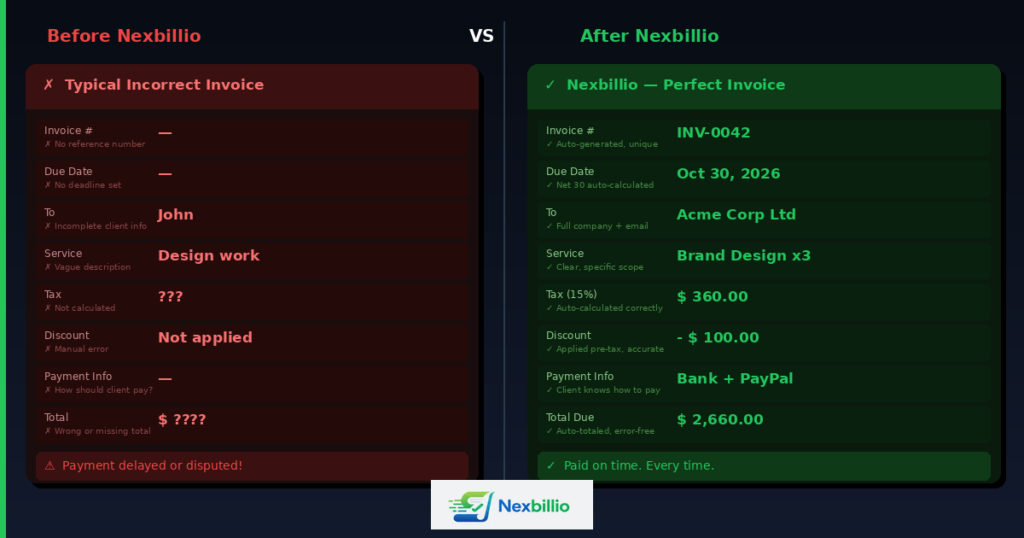
Mistake 8: Using Inconsistent or Unprofessional Formatting
A handwritten invoice. A screenshot of a spreadsheet. A Word document where the columns do not line up. These things happen — especially early in a freelance career — and they communicate something specific to the client: that the sender does not take their business operations seriously.
This is not superficial. Clients make unconscious judgments about payment priority based on professionalism signals. An invoice that looks like it came from an established business gets processed differently than one that looks improvised.
Consistency matters too. If every invoice you send looks different — different fonts, different layouts, different logo placements — clients cannot build a mental model of what your invoices look like. That makes them easier to overlook.
How Nexbillio handles it: Every invoice generated through Nexbillio uses a clean, professionally designed layout. Logo placement, typography, spacing, and section hierarchy are consistent across every invoice you create. You can apply a color theme that matches your brand, but the underlying structure remains polished and predictable. Your tenth invoice to a client looks as professional as your first.
Mistake 9: Forgetting to Save a Copy of Every Invoice
You sent the invoice three months ago. The client says they never received it. You need to resend it. But you created it in a tool that did not save your work, or you deleted the email with the PDF attached, or the spreadsheet you used is buried in a folder you reorganized twice since then.
Now you have to recreate the invoice from memory — hoping you get the line items and amounts right — or admit to the client that you do not have a record of it, which immediately undermines your position in any payment dispute.
Invoice records are also essential at tax time. Revenue figures, client names, amounts, dates — all of this comes from your invoices. If your record-keeping is incomplete, your tax filing is incomplete.
How Nexbillio handles it: Nexbillio includes a Save function that stores your current invoice in progress. You can return to it, edit it, and re-download it at any time. The tool also has a Fill Invoice feature that lets you reload a previously saved invoice and adapt it for a new billing period — which is especially useful for repeat clients who receive the same or similar services monthly.
Mistake 10: Not Following Up on Unpaid Invoices
Sending an invoice is not the same as collecting payment. Research consistently shows that a polite follow-up email sent three to five days after a payment due date increases the rate of on-time payment by a significant margin. Yet many freelancers and small business owners feel uncomfortable sending reminders — they worry about seeming pushy or damaging the relationship.
The reality is the opposite. A professional, courteous payment reminder tells the client that you are organized, that you track your receivables, and that late payment is not something you simply absorb. It also surfaces genuinely lost or overlooked invoices, which happen more often than people realize — especially in organizations where invoices are routed through multiple people.
Without follow-up, an overdue invoice often goes unpaid indefinitely. Not because the client intends to avoid payment, but because nobody flagged it.
How Nexbillio handles it: Nexbillio includes invoice status labels (Draft, Sent, Unpaid, Paid) that make it easy to see which invoices still need follow-up. The dedicated Notes field allows you to include a clear, professional message on the invoice itself — something like “Payment is due by [date]. Please reach out to [email] if you have any questions.” That proactive communication, paired with clear due dates and payment instructions, reduces the need for follow-up in the first place.
Mistake 11: Applying Discounts Incorrectly
Offering a client a discount is a good business move — it builds goodwill, closes deals, and rewards loyal customers. But applying that discount incorrectly on the invoice creates confusion and sometimes legal issues.
The most common error: showing the discount as a separate line item with a negative price, rather than using a dedicated discount field. This looks unprofessional and can cause errors in the client’s accounting system. A second common error: applying the discount after tax instead of before — which means the client ends up paying tax on an amount that should have been deducted.
How Nexbillio handles it: Nexbillio has a structured discount system built directly into the invoice. You can apply a global discount as either a percentage or a fixed amount, and you can add a reason for the discount — “loyalty discount,” “early payment rate,” “promotional pricing.” The discount is automatically applied before tax is calculated, in the correct order, every time. The final invoice shows the subtotal, discount, tax, and total in a clear breakdown that any accountant or accounts payable clerk can follow without questions.
Mistake 12: Missing Logo or Branding — Looking Like Everyone Else
Two freelancers send invoices for similar services. One invoice has a logo, consistent colors, and a professional layout. The other is a generic template with a placeholder business name. Both invoices request payment within 30 days.
Which one gets paid first? Almost always, the branded one. The psychological weight of a professional appearance influences payment priority in ways that are hard to quantify but very real to observe.
A logo on an invoice is not vanity. It is a trust signal. It says: this person runs a real business. This invoice is legitimate. This payment request deserves attention.
How Nexbillio handles it: Logo upload is a core feature of Nexbillio, not an add-on. You upload your PNG, JPG, or SVG logo and it appears prominently at the top of every invoice. Combined with the color theme selector, you can create invoices that match your brand identity without any design work — simply by uploading your existing logo.
Mistake 13: Wrong Currency or No Currency Symbol
Billing an international client in your local currency without specifying it clearly is a recipe for confusion. A number like 5,000 means very different things in USD, PKR, INR, EUR, or AUD. If the currency is not clearly stated, the client may pay in their local currency — which may be worth far less than you expected.
This is especially common when freelancers in countries like Pakistan, India, or the Philippines bill clients in the US or UK. The dollar amount they intend and the amount the client assumes can differ by a factor of ten or more.
How Nexbillio handles it: Every Nexbillio invoice displays the selected currency throughout the document — in the subtotal, in the tax line, in the total amount due. The currency symbol is always visible. You can also select from over 100 currencies, so whatever combination of billing currency and client location you are dealing with, the right currency appears clearly on the final PDF.
Mistake 14: Ignoring the Notes and Terms Section
The notes section on an invoice is often left blank. That is a missed opportunity. A short, professional message in the notes field can:
- Thank the client for the project
- Remind them of the payment method you prefer
- Reference the project or contract number the invoice relates to
- Mention any warranty or support period for the work delivered
- State late payment terms so the client understands what happens if payment is overdue
Clients who receive a thank-you note on an invoice pay faster. This has been observed consistently in billing research. It is a small thing that creates a meaningful impact on payment timing.
How Nexbillio handles it: Nexbillio includes a dedicated Notes to Client field and a separate Terms and Conditions field. These appear on the final invoice in clearly labeled sections. You can also add a custom footer text that appears at the bottom of every invoice — useful for standard statements you include in all your billing documents.
Why Getting Invoice Basics Right Transforms Your Cash Flow
These fourteen mistakes might seem like small individual issues. But consider what happens when a freelancer or small business eliminates all of them simultaneously.
Their invoices go out immediately after project completion, not days later. They include a clear due date, so clients know exactly when payment is expected. They show a unique invoice number that fits cleanly into the client’s payment processing system. They include all the seller’s contact details and payment instructions, so nobody has to ask clarifying questions. They are professionally branded with a logo and clean formatting. The math is always correct — taxes calculated on the right base, discounts applied in the right order, totals that match what the client expects.
That invoice gets processed faster. It raises fewer questions. It generates fewer follow-ups. And it communicates, clearly and without a single word of self-promotion, that the person who sent it is a professional who takes their business seriously.
The result is shorter payment windows, fewer late payments, better client relationships, and more predictable cash flow. All from fixing a set of small, easily avoidable mistakes.
How to Use Nexbillio to Create an Error-Free Invoice in Under 60 Seconds
If you want to see how this works in practice, the process is straightforward:
- Go to nexbillio.com and open the invoice generator — no account needed.
- Upload your logo if you have one.
- Select your invoice type (Invoice, Quote, Receipt, etc.) and add an invoice number.
- Fill in your business details — name, email, phone, address, and tax ID if applicable.
- Add your client’s details — name, company, email, and billing address.
- Add your line items with descriptions, quantities, and unit prices.
- Apply any discounts and set your tax rate.
- Add shipping or handling charges if relevant.
- Set your payment terms and due date.
- Enter your bank details or payment method information in the Payment Details section.
- Add a note to your client in the Notes field.
- Review the live preview on the right to confirm everything looks correct.
- Download the PDF or email it directly to your client.
Every field in that list corresponds to one of the mistakes covered above. Nexbillio’s interface is structured to walk you through each one — so by the time you hit Download, you have already eliminated every common invoice error without having to think about them individually.
Final Thoughts: The Best Invoice Is the One That Gets Paid
An invoice is not just a billing document. It is the last professional touchpoint before your client decides when to pay you. How that document looks, how clearly it communicates, and how completely it includes every required field directly influences whether payment arrives on time.
Most invoice mistakes are not about dishonesty or incompetence. They are about rushing, using the wrong tools, or not knowing what a complete, professional invoice looks like. Nexbillio solves all three of those problems at once — it is fast, it is free, and it is designed to produce a complete, professional invoice every time.
Stop chasing late payments. Stop recreating invoices from memory. Stop wondering if you applied the right tax rate or whether your discount was calculated correctly.
Use a tool that handles all of that for you — and spend the time you save on work that actually moves your business forward.
Create your first error-free invoice right now at nexbillio.com — free, no sign-up required, ready in under 60 seconds.
2 thoughts on “Common Mistakes People Make While Creating an Invoice — And How Nexbillio Makes the Whole Thing Easy”