
Somewhere between finishing the project and getting paid for it, most freelancers lose momentum. The work’s done, the client’s happy, and then invoicing turns into an afterthought scribbled in a Google Doc or, worse, a half-remembered template from three clients ago. It’s not that freelancers don’t care about getting paid. It’s that invoicing sits at the exact point in the workflow where nobody wants to spend more time than necessary.
The good news is that the invoicing software market in 2026 is genuinely crowded, which means there’s something for almost every situation, from a photographer billing five clients a year to a consultant juggling forty. The tricky part is figuring out which tool actually fits you, instead of paying for a bloated platform built for a ten-person agency. Here’s a straight breakdown.
What You’re Actually Comparing
Before getting into specific tools, it helps to know what separates them, because “invoicing software” covers a wide range of products:
- Pure invoice generators — no account, no dashboard, just fill in the details and download a PDF. Fast, free, and disposable.
- Free-tier invoicing apps — Invoice, and similar tools that give you a real account with saved clients, but usually cap something (client count, invoice volume, or annual revenue).
- All-in-one freelance platforms — Bonsai, HoneyBook, Plutio, these bundle invoicing with proposals, contracts, time tracking, and client management, at a monthly cost.
- Accounting-first tools — FreshBooks, QuickBooks, Xero, built for freelancers who also want bookkeeping, tax prep, and expense tracking in the same place.
None of these is objectively “the best.” The right one depends on how many clients you have, whether you bill hourly or per project, and how much you actually want to manage inside the invoicing tool itself.
The Free-Tier Trap Worth Knowing About
Here’s something most comparison articles gloss over: a lot of “free” invoicing software isn’t free in practice once you look closely.
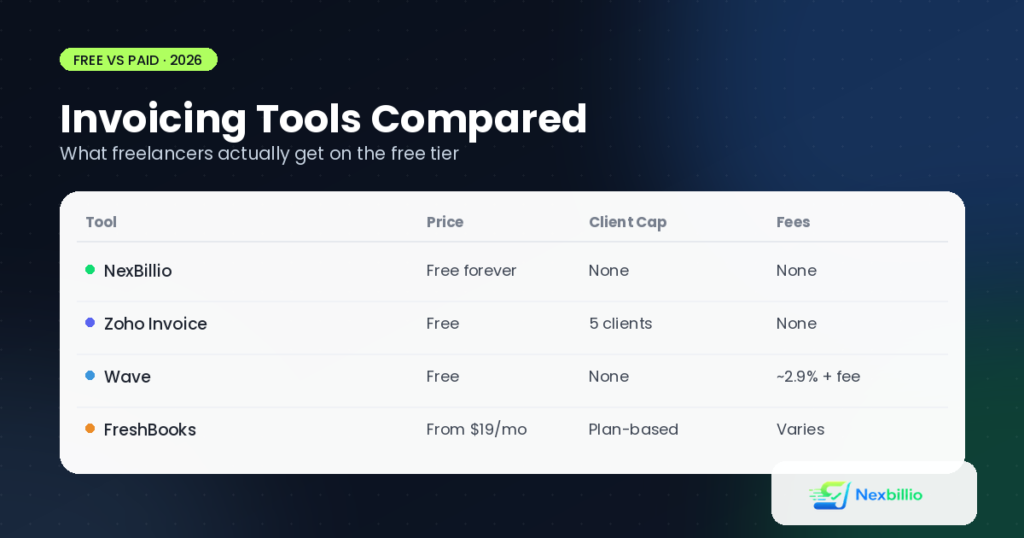
- Zoho Invoice is genuinely free with no forced upgrade, but it caps you at five clients, and some regions apply a revenue threshold on top of that.
- Wave offers free basic invoicing, but if you take card payments through it, you’re paying a processing fee of roughly 2.9% plus a flat charge per transaction. That adds up fast if you invoice often.
- Invoice Ninja’s free plan covers five clients with unlimited invoices, a solid deal if you’re not spread thin across many clients.
- FreshBooks and QuickBooks don’t really have a usable free tier for ongoing work, they’re built around a paid subscription from the start, generally landing somewhere between $15 and $30 a month depending on the plan.
None of this makes those tools bad, most are genuinely well built. But if you’re a freelancer who bills six or seven clients a year and just needs a clean, professional invoice each time, paying a monthly fee (or hitting a client cap) for features you’ll rarely touch, like recurring billing automation or built-in payment processing, doesn’t make a lot of sense.
When a Free Invoice Generator Beats a Full Platform
If your invoicing needs are straightforward, create a professional bill, apply the correct tax, send it, get paid, a dedicated invoicing platform can be overkill. This is where a tool like NexBillio fits in differently from the subscription-based names above:
- No client cap. Bill one client or fifty, the tool doesn’t care or charge you differently.
- No sign-up required. You open the tool, fill it in, and download the PDF. No account to manage, no password to forget.
- No transaction fees, because it doesn’t process payments on your behalf, it just produces the document.
- Multi-currency support across more than 100 currencies, useful if you work with international clients and don’t want to be locked into a single billing currency.
- Custom branding with logo upload, color themes, and a signature field, so the invoice still looks like it came from a real business, not a template.
- Multiple document types in one place: invoices, quotes, receipts, proforma invoices, estimates, and credit notes.
The honest trade-off: you won’t get a saved client database, automatic payment reminders, or recurring billing that fires off invoices on a schedule. If retainer clients and automated follow-ups are central to how you work, a paid platform earns its cost. But if most of your billing is one project at a time, a free generator does the job without you paying a monthly fee for features that sit unused.
Comparing the Options at a Glance
| Tool | Free Tier | Client Limit | Best For |
|---|---|---|---|
| NexBillio | Fully free | None | One-off invoices, freelancers with variable client counts |
| Zoho Invoice | Free | 5 clients | Freelancers with a small, stable client base |
| Wave | Free (fees on payments) | None | Freelancers who want basic bookkeeping alongside invoicing |
| Invoice Ninja | Free | 5 clients | Freelancers who prefer open-source, self-hosted tools |
| FreshBooks | Paid only | Plan-based | Freelancers wanting automated reminders and polish |
| Bonsai / Plutio | Paid only | Plan-based | Freelancers who also need contracts, proposals, and CRM |
How to Actually Pick One
A few honest questions, rather than a generic checklist, tend to narrow this down fast:
- How many clients do you invoice in a typical month? Under five, most free tiers work fine. Above that, check the cap before you get attached to a tool.
- Do you need the platform to also chase late payments for you? If yes, that’s an automation feature worth paying for. If you’re comfortable sending a manual reminder yourself, skip it.
- Are you billing in more than one currency? Confirm multi-currency support before committing, some “free” tools quietly restrict this to paid plans.
- Do you need contracts and proposals in the same tool, or just the invoice? Bundled platforms make sense only if you’ll actually use the extra modules.
- How much does a monthly subscription eat into a slow month? A $20/month tool is invisible in a busy month and painful in a quiet one, freelancing income isn’t always steady.
A Quick Word on Getting Paid Faster
Whichever tool you land on, a handful of habits move the needle more than the software itself:
- Send the invoice the same day the work wraps up, not a week later when the client’s already moved on mentally.
- Use “Due on Receipt” for new clients until you’ve built up trust; Net 30 is a courtesy, not a default.
- Keep line-item descriptions specific. “Consulting services” invites questions. “Website redesign — homepage and product pages, 12 hours” doesn’t.
- Add your payment details directly on the invoice instead of a separate email, it removes one extra step for the client.
The Bottom Line
There isn’t a single “best” invoicing tool for freelancers, only a best fit for how you actually work. If you’re managing a steady roster of retainer clients and want automated reminders, a paid all-in-one platform like FreshBooks or Bonsai will likely pay for itself. If your billing is more irregular, project by project, client by client, a free, no-signup invoice generator like NexBillio gets you a professional, accurate invoice in a couple of minutes without adding another subscription to the pile.
Try a couple of tools before settling. Most of the free tiers cost nothing to test, and the right fit usually becomes obvious after your second or third invoice.