
Every business owner who uses Stripe knows this feeling: a customer pays, the money shows up in the dashboard, and then the client emails asking for a proper invoice. You go into Stripe, look for a simple download button, and realize it is not as straightforward as it should be. If you have been there, you are not alone.
Stripe is excellent at processing payments. But when it comes to generating clean, professional invoices — especially for payments that came in through payment links or one-off charges — it leaves a gap. That is exactly why so many freelancers, agencies, and online businesses now look for a Stripe invoice generator free online to fill that gap without spending extra money.
This guide explains everything you need to know: what a Stripe invoice actually is, how to generate a Stripe invoice PDF in seconds, which free tools work best, and how Nexbillio makes the whole process faster and easier than anything else available.
What Is a Stripe Invoice and Why Does It Matter
A Stripe invoice is an official billing document that records a payment transaction made through Stripe. It shows the seller’s details, the buyer’s information, the items or services charged, applicable taxes, and the total amount collected.
But here is the key distinction that confuses most people: a Stripe receipt is not the same as a Stripe invoice.
A receipt is a confirmation that money changed hands. An invoice is a formal billing document that includes business details, a unique invoice number, itemized line items, and tax information. For most B2B payments, VAT-registered businesses, or clients who need to file expenses, a receipt is not enough. They need a proper invoice — one that looks professional and contains all the right information.
Stripe does have a built-in invoicing feature, but it works best when you set it up in advance before charging a customer. If a payment already came in through a payment link, a Stripe Checkout session, or a manual charge, getting a clean invoice PDF out of Stripe’s dashboard takes several steps and is not always possible without upgrading your Stripe plan or using a third-party tool.
That is where a free Stripe invoice generator becomes valuable.
Why Stripe’s Built-In Invoicing Falls Short for Many Businesses
Before jumping into solutions, it helps to understand the actual limitations people run into with Stripe’s native invoicing:
- Payment links do not automatically generate invoices. If you sell through a Stripe payment link, there is no invoice button on the completed transaction screen by default.
- Stripe charges for certain invoicing features. Sending invoices with automated reminders or enabling advanced tax features requires a paid Stripe billing plan.
- Custom branding is limited on the free tier. You cannot fully white-label your invoice PDF without going into advanced settings.
- Generating invoices for past charges is cumbersome. For older transactions or bulk invoice downloads, the dashboard workflow becomes tedious.
- Tax ID fields and PO numbers require manual setup. Business clients in countries like Germany, France, or Canada often require specific fields that Stripe does not include by default.
None of this means Stripe is a bad product — it is exceptional at what it does. But the invoicing side is not its core strength, which is why so many people search for a way to generate Stripe invoice PDFs for free using a dedicated tool.
How to Generate a Stripe Invoice for Free — The Practical Options
There are a few different ways to handle Stripe invoice generation. Each approach has its own strengths depending on your situation.
Option 1: Use Stripe’s Built-In Dashboard Invoicing
This is the most direct route, and it works well when you set it up correctly from the start.
To create and send an invoice directly from Stripe:
- Log into your Stripe dashboard
- Navigate to Billing → Invoices from the left-hand menu
- Click Create Invoice at the top right
- Select an existing customer or add a new one with their name and email
- Add your line items — description, quantity, and price for each
- Apply any tax rates you have configured in your account
- Set the payment due date and add any notes or memo text
- Click Review invoice, then finalize and send it
Stripe then emails the customer a link to a hosted invoice page where they can pay, and they can download a PDF from that page directly.
The catch: This works for new invoices going forward. If a payment already came in, this flow does not retroactively attach an invoice to it. You would need to create a separate invoice manually and mark it as already paid.
Option 2: Use a Free Online Stripe Invoice Generator
For businesses that need to generate invoices for past Stripe payments, or who want more control over the PDF layout and content, a free online tool is the faster and easier choice.
Tools like Nexbillio let you create a fully professional invoice PDF without touching the Stripe dashboard at all. You enter the transaction details — amount, items, client info, tax — and download a clean, branded PDF in under a minute. No Stripe plan upgrade needed. No account required.
This is especially useful when:
- A client requests an invoice days or weeks after payment
- You process payments through Stripe payment links with no invoice attached
- You need to add a PO number, VAT ID, or custom billing address the Stripe dashboard does not support easily
- You want to send a branded invoice that matches your business identity rather than Stripe’s default format
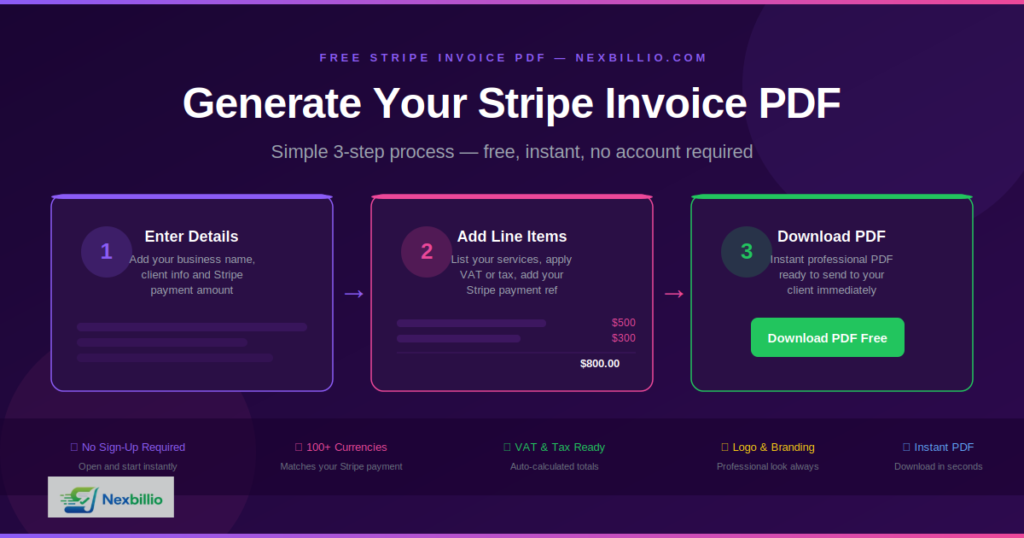
Generate Stripe Invoice PDF Free — Step by Step with Nexbillio
Here is exactly how to create a Stripe-related invoice PDF using Nexbillio at no cost:
Step 1: Go to Nexbillio.com Open the free invoice generator. No sign-up is required. The tool opens directly in your browser on any device.
Step 2: Upload Your Business Logo Click the logo upload area and add your brand image. This appears at the top of every invoice, giving it a professional, branded look that Stripe’s default format does not always provide.
Step 3: Fill in Your Business Details Enter your business name, address, email, phone number, and VAT or tax ID if applicable. This information appears in the “From” section of the invoice.
Step 4: Enter Your Client’s Information Add the client’s name, company, billing address, and any tax ID they have provided. This is critical for B2B invoices and international clients who need to claim VAT.
Step 5: Set the Invoice Details Create a unique invoice number (you can use a format like INV-2025-001 or match your own numbering system). Set the invoice date to match when the Stripe payment was received. Add a due date — if the payment has already been collected, you can set the due date as the same as the invoice date and note it as paid.
Step 6: Add Line Items from Your Stripe Payment List each product or service exactly as it appeared in your Stripe charge. Include the description, quantity, and unit price. The tool automatically calculates your subtotals.
Step 7: Apply Tax Add your VAT, GST, sales tax, or applicable tax rate. Nexbillio calculates the tax amount and adds it to the total automatically — no manual math needed.
Step 8: Add Payment Notes In the notes section, you can include your Stripe payment reference number, a thank-you message, your payment terms, or bank details for future reference.
Step 9: Download the PDF Click Download PDF and your invoice is generated instantly. You can also email it directly to your client from the tool.
The entire process takes less than two minutes and produces an invoice that looks completely professional — far cleaner than what most clients receive from Stripe’s standard receipts.
What a Good Stripe Invoice PDF Must Include
Whether you generate it through Stripe’s dashboard or a free invoice generator tool, a proper Stripe invoice should always contain these elements:
- The word “Invoice” clearly displayed at the top
- A unique invoice number for tracking and accounting
- The invoice date and payment due date
- Your full business name, address, and contact information
- Your client’s name, company name, and billing address
- Itemized line items with description, quantity, and unit price for each
- Subtotal, applied tax rate, and any discounts
- Total amount due in the correct currency
- Payment status — whether it is due, pending, or already paid
- Your accepted payment methods or, if already paid, a note confirming payment received via Stripe
- Any relevant tax IDs, VAT numbers, or PO numbers the client requires
Missing even one of these fields can cause a client’s finance team to reject the invoice and request a revised version. Getting it right the first time saves time and keeps your professional reputation intact.
Who Needs a Stripe Invoice Generator?
The short answer is: anyone who uses Stripe to collect money and has clients who need proper billing documentation.
More specifically, this includes:
Freelancers and Consultants — Independent professionals who bill clients for project work, retainers, or hourly work need invoices that match their branding and contain the right tax information. Stripe receipts do not cut it for most professional client relationships.
SaaS Founders and Subscription Businesses — When a B2B client subscribes to a software product, they typically need a monthly invoice for their accounting records. While Stripe Billing handles subscriptions well, there are still gaps when clients need corrected or retroactive invoices.
Digital Agencies — Agencies often invoice clients for multiple services bundled together — design, development, hosting, SEO. A free Stripe invoice generator lets them create itemized invoices that reflect exactly what was delivered.
E-Commerce Store Owners — Online stores using Stripe Checkout need to provide purchase invoices to customers, especially in European markets where VAT invoices are legally required.
International Sellers — Businesses selling across borders often deal with VAT ID requirements, foreign currency invoicing, and specific tax documentation that Stripe alone does not fully automate.
Stripe Invoice Generator vs. Stripe Dashboard — Which One to Use?
Here is a simple way to decide which approach makes more sense for your situation:
Use Stripe’s dashboard when:
- You are setting up invoices before charging a customer
- You want payments collected directly through the Stripe-hosted invoice page
- You have already configured your tax rates and customer profiles in Stripe
- You need automated payment reminders built into the billing flow
Use a free Stripe invoice generator like Nexbillio when:
- A payment already came in and you need a retroactive invoice
- Your client needs a PDF with custom fields that Stripe does not support
- You want a branded, professional invoice in under two minutes
- You do not want to pay for Stripe’s billing plan just to generate basic invoices
- You process payments through Stripe payment links with no invoice attached
Both tools have their place. For most freelancers and small business owners, a free online generator covers the large majority of their invoicing needs at zero cost.
Common Questions About Generating Stripe Invoices for Free
Can I generate a Stripe invoice PDF without a Stripe account?
Yes. Tools like Nexbillio let you create a Stripe-related invoice PDF entirely on your own. You enter the payment details manually and download a clean PDF. No Stripe account connection is required.
Is it free to generate invoices in Stripe?
Stripe’s basic invoicing is free, but certain features — like advanced tax automation, automated reminders, and some customization options — require a paid Stripe billing plan. Using a third-party free invoice generator avoids these fees entirely.
Can I generate an invoice for a Stripe payment link transaction?
Stripe does not automatically attach an invoice to payment link transactions. You can generate one manually using Nexbillio by entering the payment details from the transaction and downloading the PDF.
What format does a Stripe invoice PDF download in?
PDF is the standard format. It is universally accepted by accountants, finance teams, and tax authorities in every country. Every invoice you generate with Nexbillio downloads as a clean, print-ready PDF.
How do I add a VAT number or PO number to my Stripe invoice?
Nexbillio includes dedicated fields for VAT/tax IDs and PO numbers. Simply fill them in before downloading. These fields are especially important for European B2B transactions where VAT invoice compliance is legally required.
Can I send the invoice directly to my client from the generator?
Yes. Nexbillio includes an email option that lets you send the invoice PDF directly to your client’s email address without downloading it first.
Why Nexbillio Is the Best Free Stripe Invoice Generator
There are several free invoice tools available, but Nexbillio stands out for a few specific reasons that matter when you are dealing with Stripe-related invoices:
- No account required. Open the tool and start immediately. No login, no email verification, no monthly subscription.
- Unlimited PDF downloads at no cost. Generate as many Stripe invoices as you need. There is no limit and no hidden fee.
- Full customization. Upload your logo, set your brand colors, add your tax ID, include PO numbers — every field a professional invoice needs is available.
- Multi-currency support. Stripe operates in 135+ currencies. Nexbillio supports the full range, so your invoice currency always matches what was charged.
- Works on any device. Whether you are on a laptop, tablet, or phone, the tool works without any software installation.
- HTTPS secure. Your business and client data is transmitted securely and is never stored on any server.
- Instant PDF generation. The PDF is ready in seconds, not minutes.
Final Thoughts
Stripe makes collecting payments simple and reliable. But creating professional invoices for those payments — especially retroactively, or for payment link transactions — requires a better solution than what Stripe offers by default.
A free Stripe invoice generator like Nexbillio closes that gap. It lets you take any Stripe transaction and turn it into a branded, complete, client-ready invoice PDF in under two minutes, at no cost. Whether you are a freelancer billing a single client or a business managing dozens of transactions a month, the tool handles everything cleanly and professionally.
If you regularly use Stripe to collect payments and your clients expect proper invoices, bookmark this tool. It will save you time every single billing cycle.
Generate Your Free Stripe Invoice PDF Now at Nexbillio.com →