
Type “invoice generator” into Google and you’ll get roughly forty tools claiming to be the fastest, simplest, or most professional option out there. Some are genuinely free. Some say “free” and then ask for your card details on the download screen. A few dress themselves up as “AI invoice generators” without actually doing anything an AI needs to do.
If you’ve landed here because you just want to bill a client today and you’re tired of comparing tabs, this guide should save you the trial-and-error. We’ll break down what actually makes a free invoice generator worth using, where a lot of tools quietly fall short, and how to tell within thirty seconds whether the one you’ve opened is right for the job in front of you.
What “Free Invoice Generator” Actually Means (Because It’s Not Always Free)
Before picking a tool, it’s worth being clear about what separates a genuinely free invoice generator from one that just uses the word “free” as bait.
A tool earns the label if it lets you:
- Create a complete, itemized invoice with tax and totals calculated automatically
- Download a real PDF, not a watermarked preview
- Add your own logo and business details
- Use it more than once without hitting a paywall or invoice cap
A lot of tools fail on at least one of these. Some cap you at a couple of free invoices a month. Some strip your logo unless you upgrade. Some require an account and email verification just to unlock the download button, which defeats the point if you needed the invoice five minutes ago.
NexBillio: The No-Signup, No-Cap Option
NexBillio sits firmly in the “just get it done” category. You open the tool, fill in your business and client details, add line items, and download a finished PDF invoice. No account, no email verification, no invoice limit.
What stands out:
- Genuinely unlimited — there’s no monthly cap pushing you toward a paid plan
- Full logo and branding support, with the logo actually rendering correctly on the final PDF
- Per-line-item tax control, so if different products or services carry different tax rates, you’re not stuck making separate invoices for each one
- Multi-currency support across more than 100 currencies, useful if your clients aren’t all paying in the same currency
- Multiple document types in one place — invoices, quotes, receipts, proforma invoices, estimates, and credit notes, without needing five different tools
The trade-off is honest: NexBillio doesn’t save your client list between sessions or send automatic payment reminders, because it isn’t trying to be a full accounting system. It’s built for people who want a clean, correct invoice fast, not a dashboard to log into every morning.
The Other Two Types of “Free” Invoice Tools You’ll Run Into
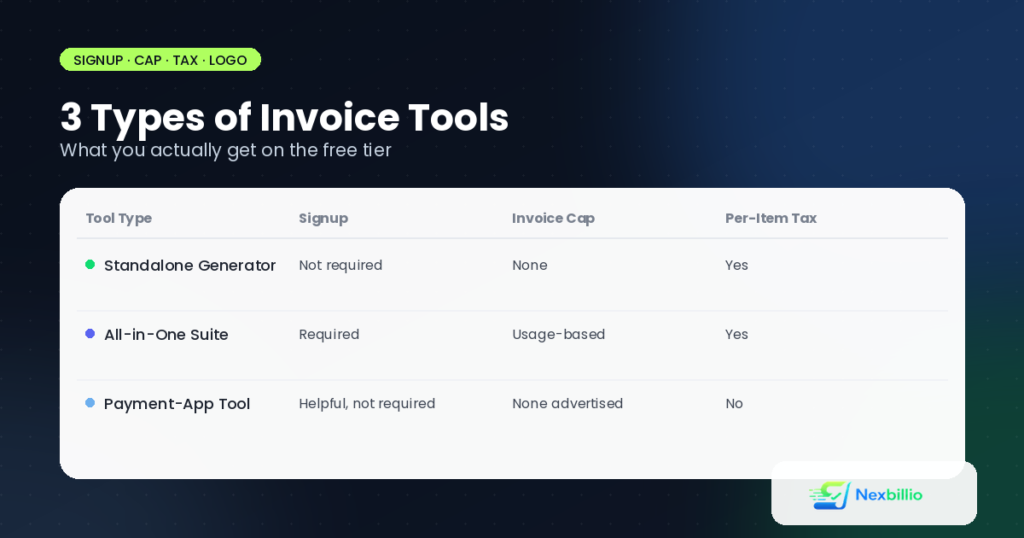
Search around long enough and you’ll notice free invoicing tools generally fall into two other buckets, beyond a standalone generator like NexBillio.
All-in-one accounting suites. These bundle invoicing together with client management, recurring billing, a customer portal, and time tracking, all wrapped inside a login you have to create and maintain. They’re genuinely feature-rich, and if you’re already running your business through that ecosystem’s other apps, the invoicing piece slots in neatly and shares your data automatically. Where it gets less convenient is for someone who just needs one invoice today, without any long-term commitment. Getting the full feature set means setting up an account first, and the interface is usually dense, built for people willing to spend time learning where things live.
Payment-app companion generators. Some money-transfer and payment platforms offer a basic invoice generator as a side feature, mainly so you can bill a client and reference your payment details in the same document. These are convenient if you’re already using that payment app day to day, but they tend to have real limitations once you dig in: uploaded logos not always rendering correctly, no ability to set a different tax rate per line item, and a fairly limited choice of templates compared to a dedicated invoicing tool. They work best as a lightweight add-on to a payment account, not as a standalone invoicing solution for a business with varied billing needs.
Neither type is “bad”, they’re just built for a different job than a quick, one-off invoice.
Side-by-Side Comparison
| Feature | NexBillio | All-in-One Accounting Suite | Payment-App Generator |
|---|---|---|---|
| Signup required | No | Yes | Account helpful, not always required |
| Invoice cap | None | Generous, usage-based | None advertised |
| Per-item tax rates | Yes | Yes | No |
| Logo upload | Reliable | Yes | Inconsistent, per user reports |
| Multi-currency | 100+ currencies | Yes | Strong, tied to the payment account |
| Document types | Invoice, quote, receipt, proforma, estimate, credit note | Invoice, quote, recurring billing | Mainly invoices |
| Best for | Quick, one-off, professional invoices | Repeat clients needing a full system | Users already inside that payment ecosystem |
What About “AI Invoice Generators”?
You’ll see more tools branding themselves as AI invoice generators these days, and it’s worth being honest about what that actually means. For a standard invoice, the heavy lifting, calculating totals, applying tax, formatting line items, doesn’t need artificial intelligence. A well-built calculator and a clean template already do that job accurately.
Where AI genuinely adds value is in different tasks entirely: scanning a pile of receipts and auto-categorizing expenses, pulling line items out of a messy email thread, or flagging anomalies across hundreds of invoices in a large business. If you’re creating a single, clean invoice for a client, the “AI” label is often more marketing than function. What actually matters is whether the tool calculates correctly, looks professional, and gets to your client without friction.
Invoice Generator vs. Excel or Word Templates
A fair number of people searching for an invoice generator are really deciding between a generator and a static template in Excel or Word. Both have a place:
- Excel templates work well if you’re comfortable with formulas and want full control over layout, but you’re responsible for getting the tax math right yourself, and formatting tends to break the moment you add or remove a row.
- Word templates are easy to edit and print but don’t calculate anything automatically, you’re typing totals in by hand.
- Online generators calculate everything for you and export directly to PDF, which is the format most clients actually expect to receive.
If you send more than the occasional invoice, a generator saves real time over re-doing the math in a spreadsheet every time a line item changes.
A Note for US-Based Businesses
If you’re invoicing within the US, keep in mind there’s no federal VAT system to account for, most invoices just need a clear subtotal, applicable state sales tax if relevant, and the total due. Compared to VAT-heavy markets like the UK or EU, US invoices tend to be simpler to format, which is one reason a lightweight generator often covers everything a US freelancer or small business needs without extra complexity.
Simple vs. Professional: Picking the Right Invoice Style
“Simple invoice generator” and “professional invoice” show up as two different searches, but they’re really two ends of the same spectrum. A simple invoice strips things down to the essentials: business name, client name, line items, total. A professional invoice adds branding, a logo, consistent formatting, and sometimes a short payment terms section. The good news is you don’t have to choose a tool based on which one you need today, a well-built generator lets you toggle between a bare-bones layout for a quick job and a fully branded version for a client who expects polish.
Frequently Asked Questions
Is NexBillio really free with no hidden limits?
Yes, there’s no invoice cap and no signup requirement. You fill in the details and download the PDF directly.
Can I use a free generator to invoice international clients?
Yes, as long as it supports multiple currencies. NexBillio covers over 100 currencies, which is worth checking before you commit to any tool if you bill clients abroad.
Which type of tool is best for a freelancer sending one or two invoices a month?
A standalone generator like NexBillio, since it doesn’t require ongoing account management for occasional use.
Do free invoice generators support recurring invoices for repeat clients?
Standalone generators are generally built around one-off, on-demand invoices. If you need automated recurring billing, that’s usually a feature of the fuller, account-based accounting suites.
The Short Version
If you bill occasionally and want a clean PDF without setting up an account, a straightforward tool like NexBillio gets you there fastest, with no cap on how many invoices you generate. If you’re deep inside a particular software ecosystem or need recurring billing for repeat clients, a full accounting suite earns the extra setup time. And if you’re already receiving payments through a specific payment app, its built-in generator is a reasonable companion tool, just don’t expect the flexibility of a dedicated invoicing platform.
Try creating one invoice and see how quickly the interface gets out of your way. That’s usually a better test than any comparison article, including this one.