

You win a $12,000 website project. It will take three months. You do the work, you send one invoice at the end — and then you wait another 30 days to get paid. That is four months of work before a single dollar arrives. Progress billing fixes this.
It means you invoice a long project in stages, as the work is finished, instead of waiting until the very end. Each stage has its own invoice, its own due date, and its own payment. Your cash flow stays steady, and your client pays for work they have already seen.
This guide explains progress billing: what it is, how milestone billing differs, how to set it up, and a worked example.
Build your first milestone invoice with NexBillio’s free invoice generator.
What Is Progress Billing?
Progress billing is a way of invoicing a long job in parts. Instead of one invoice for the whole project, you send several invoices as the work moves forward. Each invoice covers the work done so far.
Here is a simple example. A builder agrees to a $60,000 home renovation that will take four months. Instead of invoicing $60,000 at the end, the builder invoices $15,000 after the demolition is done, $15,000 after the framing is done, $15,000 after the plumbing and wiring are done, and $15,000 when the job is finished.
Progress billing is common in construction, web design, software development, consulting, and any project that takes weeks or months.
Milestone Billing vs Progress Billing: What Is the Difference?
People use these two terms as if they mean the same thing, but there is a real difference.
Milestone billing ties each payment to a specific event or deliverable. You get paid when a defined milestone is reached: the design is approved, the first draft is delivered, the site goes live. The trigger is an event.
Progress billing ties each payment to how much of the work is done. You get paid when the project is 25% complete, 50% complete, and so on. The trigger is a percentage of completion.
In practice, most small businesses use a mix of both. You agree on milestones, and each milestone is worth a percentage of the total price. A website project might be: 25% on signing, 25% when the design is approved, 25% when the site is built, and 25% at launch. That is milestone billing with percentages — and it is the most practical way to do it.
Which Billing Method Fits Your Project?
| Billing method | When you get paid | Best for | Risk for you |
|---|---|---|---|
| Upfront (100% before work) | Before you start | Small, fast jobs; new clients you do not know yet | Client may hesitate to pay everything first |
| Deposit + balance | Part now, part at the end | Design, photography, small projects | You still wait for the big final payment |
| Milestone billing | When each agreed milestone is reached | Web design, software, consulting, building work | Client may argue a milestone is not finished |
| Progress billing | At set percentages of completion | Long construction or engineering jobs | Measuring “percent complete” can cause arguments |
| On completion | Only when the whole job is done | Tiny jobs that take a day or two | You carry all the cost until the end |
For a project that lasts more than a month, milestone billing is usually the best choice. It is easy for the client to understand — they pay when they see a finished piece of work — and it is easy for you to prove, because each milestone has a clear deliverable.
How to Set Up Progress Billing in 5 Steps

Step 1: Break the project into clear milestones
List the big pieces of the job in order. For a website: design approval, homepage built, full site built, launch. For a renovation: demolition, framing, plumbing and wiring, finishing. Each milestone should be a visible result the client can check.
Step 2: Put a price on each milestone
Give each milestone a fixed amount or a percentage of the total. A common split is 25% at signing, 25% at the first milestone, 25% at the second, and 25% at completion. For a $12,000 project, that is four invoices of $3,000 each.
Step 3: Write down what “done” means for each milestone
This is the step most people skip, and it causes most disputes. For each milestone, write one sentence that says exactly what counts as finished. “Design approved” should mean “the client has signed off on the homepage design in writing”. If both sides agree on the test, nobody can argue later.
Step 4: Send a separate invoice for each milestone
When a milestone is reached, send a fresh invoice for that stage only. Number them clearly — INV-2026-051 (Milestone 1 of 4), INV-2026-052 (Milestone 2 of 4), and so on — and write the milestone name on the invoice itself. The client should be able to tell at a glance what they are paying for.
Step 5: Set a due date on every invoice
A milestone invoice without a due date is just a reminder. Put “Payment due within 14 days” or “Net 30” on every invoice, and chase it the same way you would chase any other invoice. If a client is late on milestone 2, pause work on milestone 3 until you are paid — but only if your contract says you can. This is the whole point of billing in stages: a late payment costs you one stage, not the whole project.
Progress Billing Worked Example: A $12,000 Website in 4 Milestones
Maya runs a small web design studio. Bloom Bakery hires her to build a new website for $12,000 over ten weeks. Here is how she bills it.
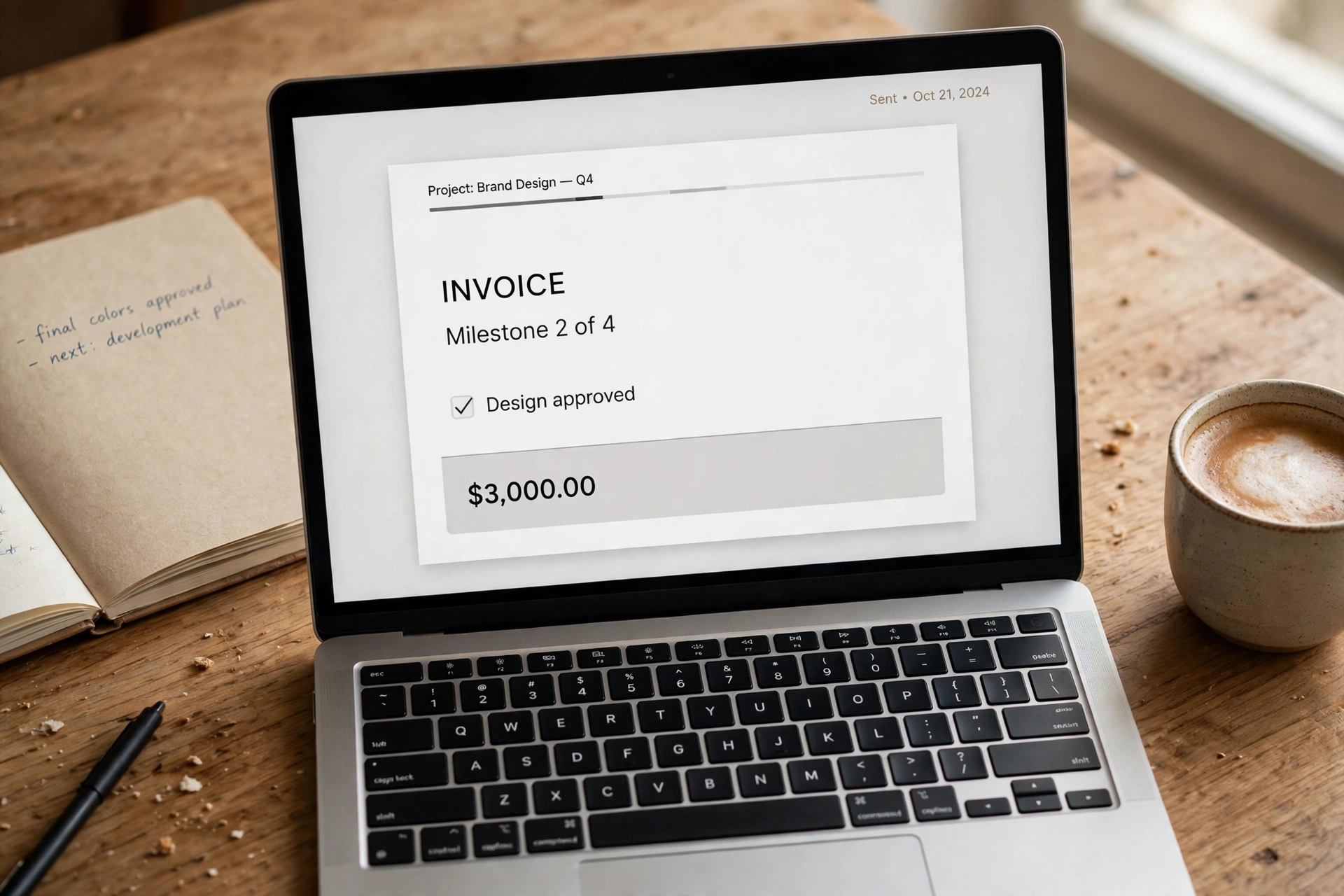
| Milestone | What is delivered | Amount | Invoice |
|---|---|---|---|
| 1. Deposit on signing | Contract signed, project starts | $3,000 (25%) | INV-2026-051, due in 7 days |
| 2. Design approved | Homepage and menu designs signed off | $3,000 (25%) | INV-2026-052, due in 14 days |
| 3. Site built | All pages live on a test link, order form working | $3,000 (25%) | INV-2026-053, due in 14 days |
| 4. Launch | Site live on the bakery’s domain, training done | $3,000 (25%) | INV-2026-054, due in 14 days |
Maya’s cash flow: she receives $3,000 in week 1, $3,000 in week 4, $3,000 in week 7, and $3,000 in week 10. If Bloom Bakery goes quiet after milestone 2, Maya has already been paid $6,000 and has only done half the work — instead of having done all the work and being owed everything.
One detail matters: Maya’s invoice for milestone 2 says “Milestone 2 of 4 — Design approved” in the description line, and the invoice number is different from milestone 1.
What to Put on a Milestone Invoice
A milestone invoice needs everything a normal invoice needs, plus two extra lines:
- Your business name, address, and contact details.
- Your client’s name and address.
- A unique invoice number — never reuse a number across milestones.
- The invoice date and the due date.
- The milestone name and number — for example, “Milestone 2 of 4 — Design approved”. This is the line that stops confusion.
- A short description of what was delivered in this stage.
- The amount for this milestone only — not the whole project total. If you want, add a small line underneath: “Project total $12,000 — paid so far $6,000 — this invoice $3,000 — remaining $3,000.”
- How and when to pay — bank details or a payment link, and the payment term in words.
That “paid so far / remaining” line is worth adding. It shows the client exactly where they stand, and it stops the most common question bookkeepers ask: “Is this the last invoice?”
5 Progress Billing Mistakes (and How to Fix Them)
Mistake 1: Milestones that are too vague.
“Phase 1 complete” means nothing if the client disagrees. Fix: write one sentence per milestone that says what is delivered and how the client checks it. Get it signed before work starts.
Mistake 2: Billing the whole project on the first invoice.
Some businesses send one invoice for the full amount at the start and call it milestone billing. It is not — the client will not pay $12,000 for work they have not seen. Fix: one invoice per milestone, each for that stage’s amount only.
Mistake 3: No due date on milestone invoices.
Without a due date, the client treats the invoice as “pay whenever”. Fix: put a due date on every invoice — 14 days is fair for most stages — and follow up on the day it passes.
Mistake 4: Starting the next stage before the last one is paid.
You finish milestone 2, the client has not paid milestone 1, and you start milestone 3 anyway. Now you are owed two stages. Fix: make it a rule — no payment, no next stage — and put that rule in your contract.
Mistake 5: Forgetting to track what is paid and what is left.
After three milestones, you lose track of whether the client owes $3,000 or $6,000. Fix: keep a simple running total on each invoice (“paid so far / remaining”) and a one-page tracker for the project. A deposit invoice works the same way for the first payment, so the habit transfers.
When Progress Billing Does Not Fit
Progress billing is not right for every job. If a job takes less than two weeks or costs under a few hundred dollars, one invoice at the end is simpler — the admin of four invoices is not worth it. And if the client is a large company with a fixed purchase order process, they may insist on a single invoice that matches their purchase order exactly.
It also fits poorly when the work cannot be split into visible pieces. A lawyer’s ongoing advice, for example, is usually billed monthly by the hour, not by milestones — that is recurring billing, a different pattern.
Progress Billing and Your Cash Flow
The real benefit of progress billing is cash flow. A freelancer who bills $12,000 once at the end of a ten-week project has ten weeks of costs and zero income from that client. The same freelancer billing in four stages has money coming in from week 1.
It also changes the client relationship. A client who pays $3,000 four times feels the cost in small, fair steps. A client asked for $12,000 at the end, after months of silence, is far more likely to question the bill or delay it. Small, regular invoices get paid faster than one big one. If a payment does go late, the same escalation plan you use for any unpaid invoice works here too — the only difference is that you can pause the next stage while you chase it.
Frequently Asked Questions
How many milestones should a project have?
Three to five is the sweet spot for most projects. Fewer than three and you are barely staging the payments; more than five and the admin starts to outweigh the benefit. A $12,000 website works well with four. Match the milestones to natural breaks in the work, not to an arbitrary number.
Is milestone billing the same as a deposit invoice?
No, but they work together. A deposit invoice is the first payment — usually 25% to 50% — paid before work starts. Milestone billing is the whole system of staged payments across the project. The deposit is often milestone 1.
Can I charge interest if a milestone payment is late?
In most places, yes — if your contract or invoice says so. Put the late fee in writing before the work starts, for example “1.5% per month on overdue amounts”, and state it on every milestone invoice. The rules differ by country, so check the late payment rules for your location before you charge interest. For the UK, see the official invoicing guidance.
What if the client cancels halfway through a project?
This is exactly what milestone billing protects you from. If the client cancels after milestone 2, you have been paid for the work you did, and the remaining milestones simply never happen. Make sure your contract says the client pays for completed milestones even if the project stops.
Do I need a contract for milestone billing?
Yes. A one-page agreement is enough: the milestones, the amount for each, what “done” means for each one, the due dates, and what happens if a payment is late or the project stops. Without it, a milestone dispute becomes a “he said, she said” argument.
The Short Version
If a project takes more than a month, do not bill it once at the end. Break it into three to five milestones, agree on what “done” means for each one, and send a separate invoice per stage with its own due date. You get paid as you work, and a late payment costs you one stage instead of the whole project. Build your first milestone invoice with NexBillio’s free invoice generator — no sign-up, no watermark.
1 thought on “Milestone & Progress Billing: How to Invoice Long Projects in Stages (With Example)”